Crosshair
Your own crosshair over a game: a cross, a circle, a dot or a picture, centered on a display.
A crosshair is a small window that sits above other windows and lets every click through. It marks the center of the display you choose, or a point offset from it, for a game with no crosshair of its own or one that hides it. Up to ten crosshairs run at once, each with its own look and its own switch.
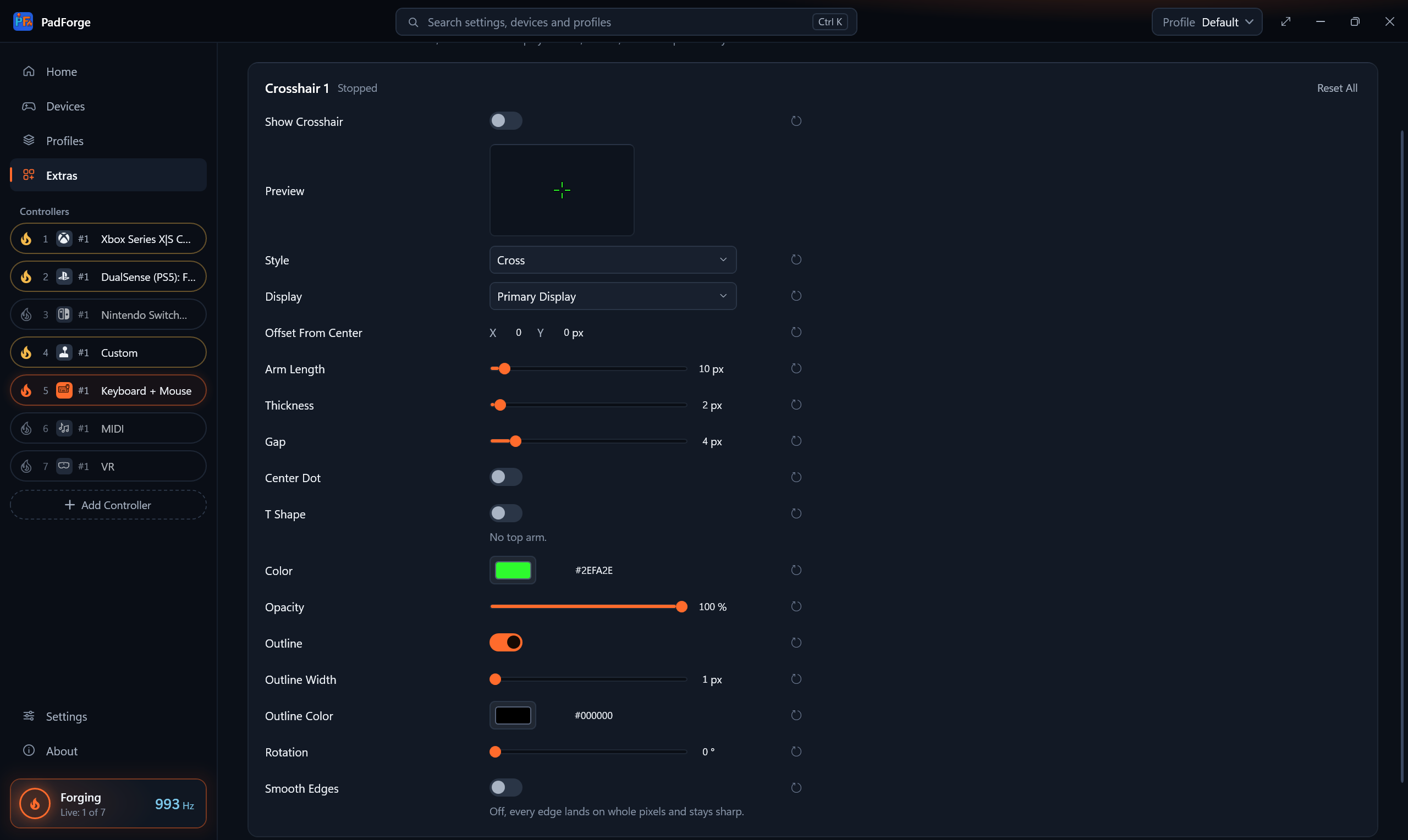
The page
Open Extras in the sidebar and click the Crosshair tile, in the On Screen group. The page starts with one crosshair, off. Crosshairs show while the input engine runs.
The tile's switch is on while any crosshair is on. Turned off, it turns every crosshair off and remembers which were on. Turned on again, it brings those back, or the first crosshair when it remembers none.
Each crosshair has a card. Its head names it, Crosshair 1, Crosshair 2 and so on, with its status beside the name:
| Status | Meaning |
|---|---|
| Running | The crosshair is on the screen. |
| Stopped | The crosshair is off, or the engine is not running. |
| No picture to show | A Picture crosshair whose file is missing or cannot be read. |
| Off its display | The offset puts all of the crosshair outside its display. |
The status follows a display that is plugged in or out, or that changes its resolution: a crosshair that a change pushes off its display, or brings back onto it, says so.
Reset All in the card's head turns the crosshair off and puts every value back to its default. Remove sits beside it while the page holds more than one crosshair. Add Crosshair at the top of the page adds one, up to ten. A new crosshair takes the lowest free number, and a crosshair keeps its number when another is removed, so a macro that names crosshair 3 always reaches the same one.
Every row has its own reset button.
Where it goes
| Row | What it does |
|---|---|
| Show Crosshair | Shows the crosshair. Off by default. |
| Preview | The crosshair as it draws, at its size in the display's pixels. One too large for the box is shrunk until all of it shows. |
| Style | Cross, Circle, Dot or Picture. Cross by default. The rows below change with the style. |
| Display | The display the crosshair centers on: Primary Display or one display by its number and resolution. A saved display that is not connected is listed as not connected, and the crosshair goes to the primary display until it is back. The list follows displays plugged in or out while the page is open. |
| Offset From Center | X and Y, in pixels from the display's center, from -4000 to 4000. Right and down are positive. 0 and 0 by default. |
The crosshair marks the display's center rounded to a whole pixel, plus the offset.
How it looks
Cross
| Row | Range | Default |
|---|---|---|
| Arm Length | 0 to 200 px past the gap | 10 |
| Thickness | 1 to 40 px | 2 |
| Gap | -20 to 200 px from the center to where an arm begins. Below 0 the arms overlap. | 4 |
| Center Dot | A dot at the center, a thickness square | Off |
| T Shape | No top arm | Off |
Circle
| Row | Range | Default |
|---|---|---|
| Radius | 2 to 400 px, from the center to the middle of the ring's line | 12 |
| Sides | 3 to 64. At 64 the ring is round. Fewer sides draw a polygon with its first corner straight above the center. | 64 |
| Thickness | 1 to 40 px | 2 |
| Center Dot | A dot at the center | Off |
Dot
| Row | Range | Default |
|---|---|---|
| Size | 1 to 100 px wide | 4 |
Picture
| Row | What it does |
|---|---|
| Picture | The file's name, or No picture chosen, and Browse… to choose one. PNG, GIF, BMP, ICO, TIFF, JPEG and WebP are listed, and any other picture Windows reads works too. Transparency is kept. An icon or TIFF that holds several pictures shows its largest. A chosen picture starts at its own size. |
| Size | Width and height in pixels, 1 to 8000 each. Picture’s Own Size sets them back to the picture's. The row's reset does the same, or sets 64 by 64 with no picture. |
| Keep Proportions | On by default: width and height move together in the picture's own proportions. Off, the picture stretches to both. |
A picture draws its own colors, so the Color and Outline rows hide for it. Opacity, rotation and Smooth Edges apply. PadForge reads the file again each time the crosshair shows, so a picture edited or replaced on disk shows as it is now.
Every style
| Row | What it does | Default |
|---|---|---|
| Color | A swatch that opens a color picker under its row, and the color as #RRGGBB. Not shown for a picture. | #2EFA2E, a bright green |
| Opacity | 0 to 100%, for the crosshair as one piece, outline included | 100% |
| Outline | A border drawn around the shape and under it. Not shown for a picture. | On |
| Outline Width | 1 to 10 px on every side | 1 |
| Outline Color | As Color | #000000, black |
| Rotation | 0 to 359 degrees clockwise, about the center | 0 |
| Smooth Edges | On, edges are smoothed. Off, every edge lands on whole pixels and stays sharp, and a picture is scaled by its nearest pixels. | Off |
Sizes are in the display's pixels on a display of any scale, so a 2-pixel arm is 2 pixels at 150% as at 100%.
Limits
- A game in exclusive full screen hides the crosshairs. Run it windowed or borderless. The page's note says the same.
- A crosshair belongs to one display. The part of it past that display's edge is cut off.
- In the Magnifier's Full Screen mode, Windows zooms the crosshairs with everything else. The Lens leaves them out of what it magnifies and keeps them above it, and they stay above the Spotlight too.
- Once a second, a crosshair goes back above a game that put its own window on top after the crosshair came up.
Macros
Toggle Crosshair, under Layers & Overlays in a macro's action list, shows or hides a crosshair. Its Crosshair box names Every Crosshair or Crosshair 1 to Crosshair 10. With Every Crosshair, any crosshair that is on turns them all off, and none on turns them all on. A macro on any slot reaches the crosshairs. See Macros.
Profiles
Each profile keeps the page's crosshairs: which exist and every value of each. A profile switch shows the crosshairs that profile has on and hides the rest. A profile saved before PadForge 6.0.0 has one crosshair, off.
Imported profiles
reWASD has up to ten crosshairs, kept in reWASD's own settings rather than in a config. The import turns a button that toggles reWASD's crosshair 1 to 10 into Toggle Crosshair for PadForge's crosshair of that number, and reWASD's command for every crosshair into Toggle Crosshair for Every Crosshair. Each is reported as Partial: reWASD keeps its crosshairs in its own settings, not in the config. Set yours up on the Crosshair page. Give each crosshair its look here.
See the technical page, Crosshair and Magnifier Internals.
Last updated for PadForge 6.0.0.