Start from a starter profile
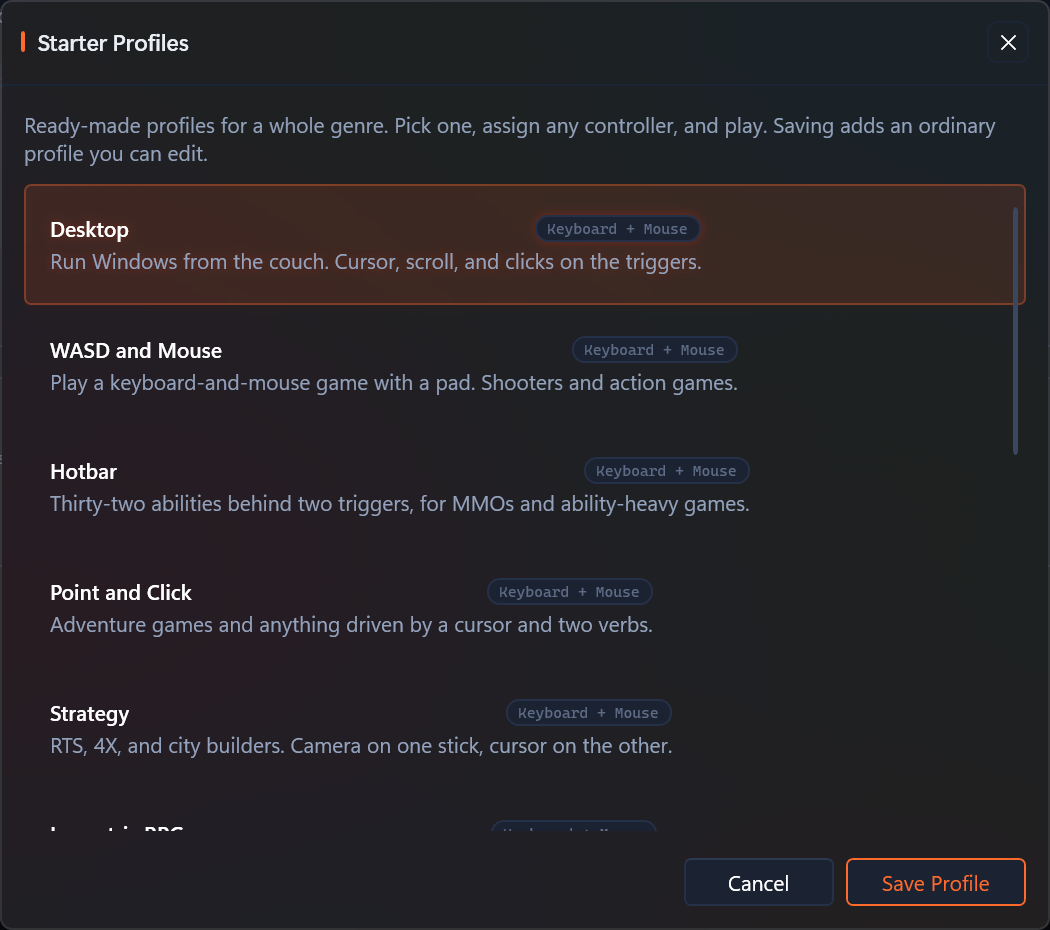
Starter profiles are ready-made profiles for a whole genre. Pick one, assign any controller, and play.
They are archetypes rather than game configs, so one profile covers a kind of game instead of a single title. Nothing about them is locked: saving one adds an ordinary profile you can edit, exactly like importing a community config.
Open them from Profiles with Browse Starter Profiles, beside Browse Community Configs.
Why they work on any controller
A starter profile never names hardware. Its rows bind abstract inputs like Gamepad ButtonA and Gamepad LeftStickX, which resolve to whatever the assigned controller actually has, and every row is set to "(Any Device)". Assign a DualSense, an Xbox pad, or a Switch Pro Controller to the slot and the same profile drives all three.
Touchpad and stick both drive the mouse
Every profile that moves a cursor offers the touchpad and the stick at the same time. There is no setting to flip and no separate touchpad version to pick.
- While no finger is on the pad, the stick drives the cursor as a rate.
- The moment a finger lands, the cursor goes where the finger is.
- Lift the finger and the stick takes over from where it stopped.
On a controller with two touchpads the right pad wins. On a controller with none, the stick simply does all the work.
Which stick backs the touchpad up depends on the profile. Point and Click and Isometric RPG put the cursor on the left stick and keep the right one for the camera, because in those games the pointer and the view are two different jobs for two different thumbs. Everything else uses the right stick.
The profiles
Keyboard and mouse
These drive a keyboard and mouse, for games and desktops that never wanted a gamepad.
| Profile | For |
|---|---|
| Desktop | Running Windows from the couch |
| WASD and Mouse | Shooters and action games |
| Point and Click | Adventure games and cursor-driven games |
| Strategy | RTS, 4X, and city builders |
| Isometric RPG | Party RPGs and turn-based tactics |
| Twin-Stick | Top-down shooters and roguelites |
| Media Remote | Playback and seeking |
| Hotbar | MMOs and ability-heavy games |
Gamepad
These barely remap anything. They exist because a stock pad is not tuned for the genre, and the tuning is what nobody gets around to doing by hand.
| Profile | For |
|---|---|
| Fighting Games | 2D fighters, set up to clear the rules |
| Emulation | RetroArch and the frontends built on it |
| Racing | Calmer steering and finer control near center |
| Space Sim | Six degrees of freedom on two sticks |
| Gyro Aim | Motion for fine aim, with the stick still live |
A few worth knowing about
Hotbar puts 32 abilities behind two triggers
Hold the left trigger for eight slots on the D-pad and face buttons, hold the right trigger for a different eight, and double-tap-and-hold either trigger for sixteen more. The second tap has to land within 442 ms of the first. That is the arrangement Final Fantasy XIV's Cross Hotbar uses, and the double-tap tier is a real activator rather than a macro workaround.
Fighting Games clears the tournament rules
SOCD cleaning is set to Neutral on both axes, so pressing left and right together produces no movement, and the same for up and down.
Capcom's tournament rules require opposing directions pressed together to produce no movement, on the horizontal and the vertical axis alike. Only neutral cleaning, or no cleaning at all, does that. Evo's baseline is looser and also permits first- and last-input priority, so Neutral is the one setting legal under both rulesets, whichever a given event runs.
The profile also binds only one directional surface. The D-pad drives and the left stick is left unbound on purpose, because the rules cap movement at one input system per direction. It ships no macros, since hardware macros are prohibited outright.
Emulation puts the hotkeys on Back
Hold Back and the shoulders save and load state, the triggers fast-forward and rewind, the D-pad's left and right step the state slot, Y opens the menu, and Start exits the content. They send RetroArch's own default keyboard hotkeys, so they work against a stock install with no remapping. That mirrors how RetroArch's hotkey modifier works.
Back is the modifier and nothing else. A shift-layer activator eats its own input, so while Back is held the pad's own Back output is suppressed and the emulator never sees a stray press.
The left stick also drives the D-pad, because NES, SNES and Genesis cores have no analog sticks at all. Without that, a stick-first player gets nothing.
Space Sim is Frontier's own layout
Roll on the left stick's X, pitch on its Y, vertical thrust on the right stick's Y. Those three are unanimous across every gamepad preset Elite Dangerous ships. Throttle is the bumpers, because a self-centering stick cannot hold a throttle setting, and Frontier only puts an absolute throttle axis on their HOTAS presets. The triggers are the guns.
What the profile adds over a bare pad is the response shape. Docking happens in the first tenth of stick travel, so every flight axis is softened near center and keeps full authority at the rim. Click the right stick for a Precision mode that softens it much further, and click again to leave.
One thing it deliberately does not do. Elite ships two gamepad presets that differ on a single axis: right-stick X is yaw in one and lateral thrust in the other. Both use the same physical output, so which one you get is decided inside Elite's own binding file, and no controller profile can reach it. Pick the preset you want in-game.
Media Remote sends the real media keys
Play/Pause, Stop, Mute, Volume Up and Down, Next and Previous Track, and
browser Back are the actual system keys, so they work in whatever is
playing rather than only in a player that happens to bind space and F.
They ride the macro lane, because the keyboard row engine carries letters
and arrows but not the media block.
The arrows still seek, since seeking has no system key.
Gyro Aim engages on the left trigger
Motion drives the right stick alongside the stick itself, so aiming gains precision instead of losing the stick. The gyro only steers while the left trigger is held. Always-on motion reads as drift during normal play, and aiming is exactly when you want it.
It also has a calibrate button. Hold Back for 800 ms and the gyro recenters. Motion controls drift, and a recenter you can only reach by opening the app is not much of a recenter. Back keeps its ordinary press, because the recenter rides a macro that does not consume its trigger.
Silencing the pad
Every profile has a quiet layer. Hold Guide and Start together for 600 ms and the controller stops sending anything at all. Hold them again to bring it back. The layer is named Quiet (Nothing Sends) on the flyout.
This is for the moment you alt-tab away and do not want the pad typing into whatever now has focus.
It is two buttons on purpose. A layer that opens on a single button takes that button over completely, so putting the gesture on Start alone would cost you Start outright. A pair costs nothing: each button keeps its own binding, and only the two together mean anything else. Guide works here because PadForge hides the physical controller from Windows, so the press reaches PadForge instead of opening Game Bar.
On Media Remote this is why Stop is a quick tap of Guide rather than a plain press. Holding Guide is the start of the silence gesture, so a press that turns into a hold no longer stops playback.
The one controller this does not reach is a pad whose driver profile has no Guide button at all. There is no second gesture for those, because every other pair of buttons is already spoken for in at least one profile, and taking one back is the thing this design exists to avoid.
What they do not do
- They never switch automatically. An archetype has no executable to match on, so you pick one by hand. Per-game switching is what per-game profiles are for.
- Racing ships a shape, not a truth. The steering curve is a sensible starting point to nudge, not a claim about any particular game. Racing titles disagree wildly about what their own numbers mean.
- Twin-Stick aims with time on a stick-only pad. With a touchpad the aim is absolute, meaning the cursor goes exactly where your thumb is. Without one, the cursor moves at a rate instead, which is what every stick-only setup has always done.
Related
- Import a Steam config brings in a config someone published for a specific game.
- Per-game Profiles covers switching profiles by executable.
- Shift Layers explains the mechanism the Hotbar and Emulation profiles are built on.
Last updated for PadForge 4.5.0.