Game Mods
Game mods made for DSX set your DualSense's adaptive triggers, lightbar, player lights and mute light through PadForge.
Fans have written mods that give games without DualSense support adaptive triggers: the Grand Theft Auto games, Red Dead Redemption 2, Skyrim, Fallout 4, Escape from Tarkov, Forza, Wreckfest 2, Richard Burns Rally and others. Each mod watches its game and sends what the triggers and lights should do to a program named DSX, over the network on your own PC. PadForge can take DSX's place. Turn on Accept DSX Game Mods and the mods send to PadForge, which plays their effects on the PlayStation controllers on your virtual controllers.
PadForge speaks the same interface as DSX and as the open programs that took it up: DualSenseY, DSZ and a fork of DS4Windows. A mod written for any of them works with PadForge unchanged.
Turning it on
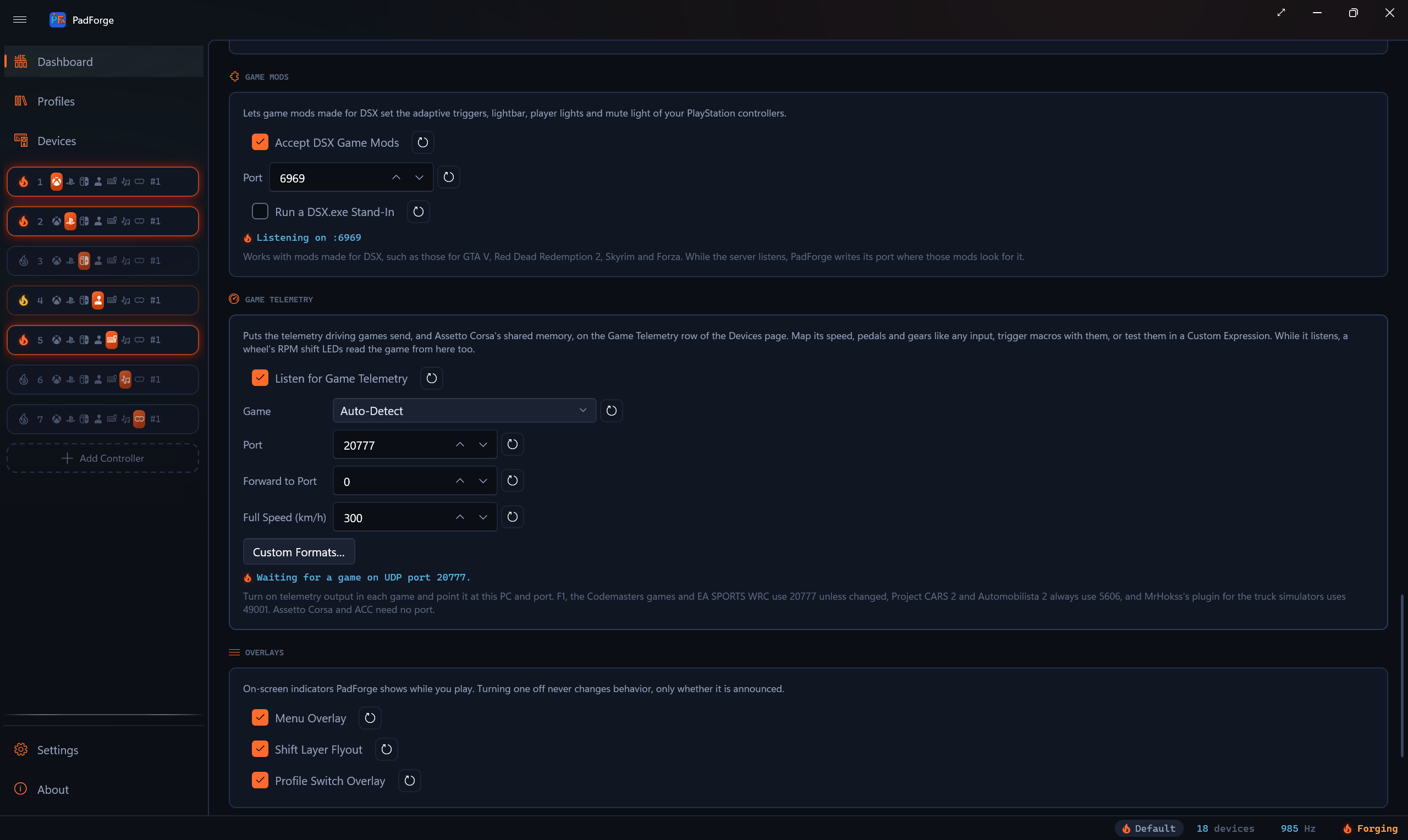
- On the Dashboard, find the Game Mods section and tick Accept DSX Game Mods. It is off by default.
- Leave Port at 6969, the port DSX and the mods use. The reset button beside it returns it to 6969.
- Start the input engine with the play button. The flame lights and the line reads Listening on :6969.
- Start the game with its mod installed.
While a mod sends, the line names it and the virtual controller its effects reach, for example Listening on :6969. GTA5.exe is sending to virtual controller 1. A mod that runs inside the game shows the game's program.
DSX and PadForge cannot both listen on one port. With DSX running on 6969 the line reads Port 6969 is in use by another program, such as DSX. Close it or choose another port. Close DSX, or give PadForge another port and set the mod to it. While the switch is on and the engine runs, PadForge tries the port again every 3 seconds, so the server starts on its own once DSX closes.
Where mods find the port
Mods read the port from a file DSX writes. Mods made for DSX 2 read C:\Temp\DualSenseX\DualSenseX_PortNumber.txt, and some of them stop without it. Mods made for DSX 3.1 read DSX_UDP_PortNumber.txt in %LOCALAPPDATA%\DSX and use 6969 when it is missing. When the server starts, PadForge creates the first file if it is missing and corrects either file if it names another port. It makes the second file only for a port other than 6969, and it leaves both alone while DSX itself is running.
Run a DSX.exe Stand-In
Some mods check that a program named DSX is running before they send anything. DualSense4GTAV, for one, turns itself off without it unless its connection messages are switched off in its menu. Tick Run a DSX.exe Stand-In and PadForge runs a small program named DSX.exe while the server listens. It does nothing but wait, it ends when the server stops or PadForge closes, and Task Manager lists it as PadForge stand-in for DSX game mods. Leave the switch off unless a mod needs it.
Which controller a mod drives
Mods name the controller they drive by number, and every mod checked for this release sends controller 1 (number 0 in the packets). PadForge counts the virtual controllers that have an online DualSense, DualSense Edge or DualShock 4 on them, in the order the Dashboard numbers them. A mod's controller 1 is the first of those, its controller 2 the second, and so on. A DualSense on virtual controller 2, behind a wheel on virtual controller 1, is still the mod's controller 1. When that list changes, because a virtual controller is turned on or off or a PlayStation controller arrives or leaves, a mod's effects move at once to the controller its number now names, and the controller they left drops them. A mod that sends to a number past the last of them gets a line that says so, for example Listening on :6969. GTA5.exe is sending to controller index 1, and no virtual controller with a PlayStation controller on it has that index.
What a mod sets goes to every PlayStation controller on that virtual controller:
| DualSense and DualSense Edge | DualShock 4 | |
|---|---|---|
| Adaptive triggers | Yes | No triggers to drive |
| Lightbar | Yes | Yes |
| Player lights | Yes | None on the controller |
| Mute light | Yes | None on the controller |
A mod's lightbar color also reaches the mice, keyboards and lighting rows this virtual controller lights, the way a game's color does (see Lighting).
An Xbox controller with impulse triggers plays a mod's trigger vibrations on them when Translate Adaptive Trigger Vibrations is on, on the Impulse Triggers tab. Resistance has no impulse equivalent.
Trigger thresholds
A mod can ask that a trigger count only past a point. Below that point the virtual controller reports the trigger as released, so a gun fires only once the trigger passes its resistance wall. This applies to the analog triggers of every virtual controller type: Xbox, PlayStation, Extended, and Nintendo layouts that have them. A Nintendo controller's ZL and ZR are buttons, and a threshold leaves them alone.
How long a mod's effects last
A mod's effects stay until one of these happens:
- The program that sent them exits, or crashes. PadForge watches the process that owns the mod's connection.
- The mod resets the controller.
- You click Clear Mod Effects.
- You turn Accept DSX Game Mods off, or stop the engine.
When they end, your own settings return: the trigger settings on the Adaptive Triggers tab, the Lighting tab's colors, and PadForge's player lights. A trigger with no setting of its own is released.
What you see while a mod holds something
- On the Devices page, the controller's panel names the program and what it sets, such as GTA5.exe is setting this controller's triggers and lights, with a Clear Mod Effects button below. A mouse, keyboard or lighting row the virtual controller lights reads GTA5.exe is setting this device's lights.
- On the virtual controller's page, the Adaptive Triggers, Impulse Triggers and Lighting tabs each show an orange line while a mod sets something there.
Games and mods together
A game that writes to a virtual DualSense itself keeps the controller while it writes: its trigger and light writes win, and a mod's take over once the game stops writing. Your own settings come last. In practice a DSX mod runs with a game that has no DualSense support of its own, so the two rarely meet.
Mods made for this interface
| Mod | Games |
|---|---|
| DualSense4GTA5 | GTA V |
| GTASense | GTA III, Vice City, San Andreas |
| DualSense4Rockstar | GTA IV, GTA V, Red Dead Redemption 2 |
| DSXSkyrim-NG, DSXFallout4 | Skyrim, Fallout 4 |
| TarkovDSX | Escape from Tarkov |
| ForzaDSXlegacy | Forza Horizon 4 and 5, Forza Motorsport 7 |
| WF2_DSX | Wreckfest 2 |
| RBR_Adaptive_Trigger | Richard Burns Rally |
| Race-Element | Driving and flight simulators |
PadForge's tests replay packets from TarkovDSX, DSXFallout4, DSXSkyrim-NG, DualSense4Rockstar, WF2_DSX, ForzaDSXlegacy, RBR_Adaptive_Trigger and Race-Element, and from two libraries mods are built with, DSX++ and a Godot plugin. Any other mod made for DSX speaks the same interface.
Limits
- DSX's ten named trigger presets (Very Soft through Hardest, Choppy, Medium and others) were never published. PadForge sends the bytes DualSenseY sends for them, which came from DSX's own code, so they should feel as they do under DSX, but nobody has compared them on a controller side by side.
- No mod has yet been run against this release on a real DualSense.
See the technical page, Game Mods Internals.
Last updated for PadForge 5.2.0.