Analog Keyboards
How far every key is pressed, on analog and Hall effect keyboards, as a device row you can map to any controller.
An analog keyboard measures how far each key travels, where an ordinary keyboard knows only whether a key is down. PadForge reads that depth straight from the keyboard and gives the keyboard its own row on the Devices page, beside its normal keyboard row. Every key becomes a source you can put on a button, a trigger, or a stick axis of any slot, including an Extended controller with up to 8 axes and 128 buttons.
Your typing is untouched. The normal keyboard row and Windows keep receiving the keys as usual. PadForge reads the depth alongside them.
Turning it on
Open Settings, find the Input Engine card, and tick Read Analog Keyboards. It is off by default.
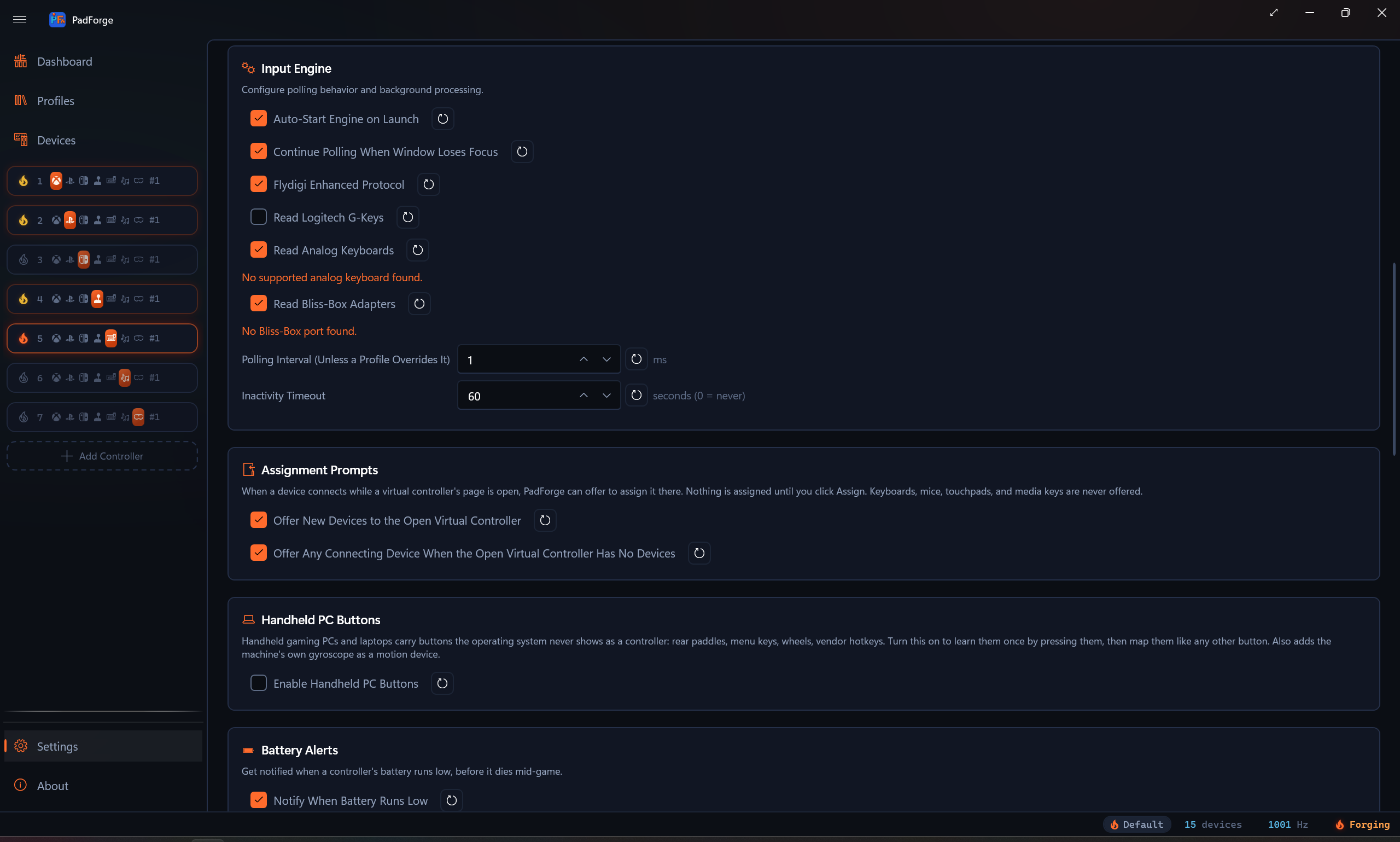
With it on, every supported keyboard that is plugged in gets a row on the Devices page, named for the model. The line under the checkbox names the keyboards being read, says when none was found, and says when a Razer keyboard is waiting for Razer Synapse.
Most keyboards are read by asking them over the channel their own configurator uses. Close that configurator, whether an app or a browser tab, while the switch is on. Both asking the same questions confuses the keyboard and the configurator alike, and on some keyboards PadForge holds the channel alone, so the configurator cannot open it while PadForge reads.
What you need
| Keyboard | Needs |
|---|---|
| Razer Huntsman analog models and the Tartarus Pro | Razer Synapse running. Without it they send no depth, and the row reads nothing until Synapse starts. |
| Keychron and Lemokey HE boards | Nothing extra. Stock firmware works on every board, the 8K boards included. On the Keychron Q1 HE and K2 HE, the Q3 HE and Q5 HE in ANSI, and the Lemokey P1 HE in ANSI, the AnalogSense firmware reports every key at once and reads faster. |
| NuPhy HE boards, the MADLIONS Nano 68 and Fire 68 lines, and the MADLIONS MAD 68 R, MAD 68 Pro and MAD 68 Pro R | Nothing extra. PadForge turns on the keyboard's depth reports when it starts reading and turns them off again when it stops. On a NuPhy board it does this the way NuPhy's own configurator does for its Performance page. |
| MCHOSE Mix 87 III | Stock firmware 1.22. Its depth reports need a flag in the keyboard's saved settings. PadForge sets it when it starts reading and clears it when it stops, which rewrites the keyboard's settings memory twice per session. If reading stops while the keyboard stays plugged in, turn Read Analog Keyboards off and on again to resume. |
| MCHOSE Jet 75 and other keyboards that send depth on their own | Press a key. PadForge listens without sending anything, and the row appears at the first depth report. |
| ASUS ROG Azoth 96 HE | A USB cable. PadForge does not read it through its wireless receiver or over Bluetooth. |
| Everything else | Nothing extra. |
The device row
Select the row on the Devices page and a Key Depth panel replaces the usual axes and button grid. Each key you press joins the panel in keyboard order, with a bar and a percentage for how far down it is. Until a key moves, the panel says Press a key to see how far down it goes.
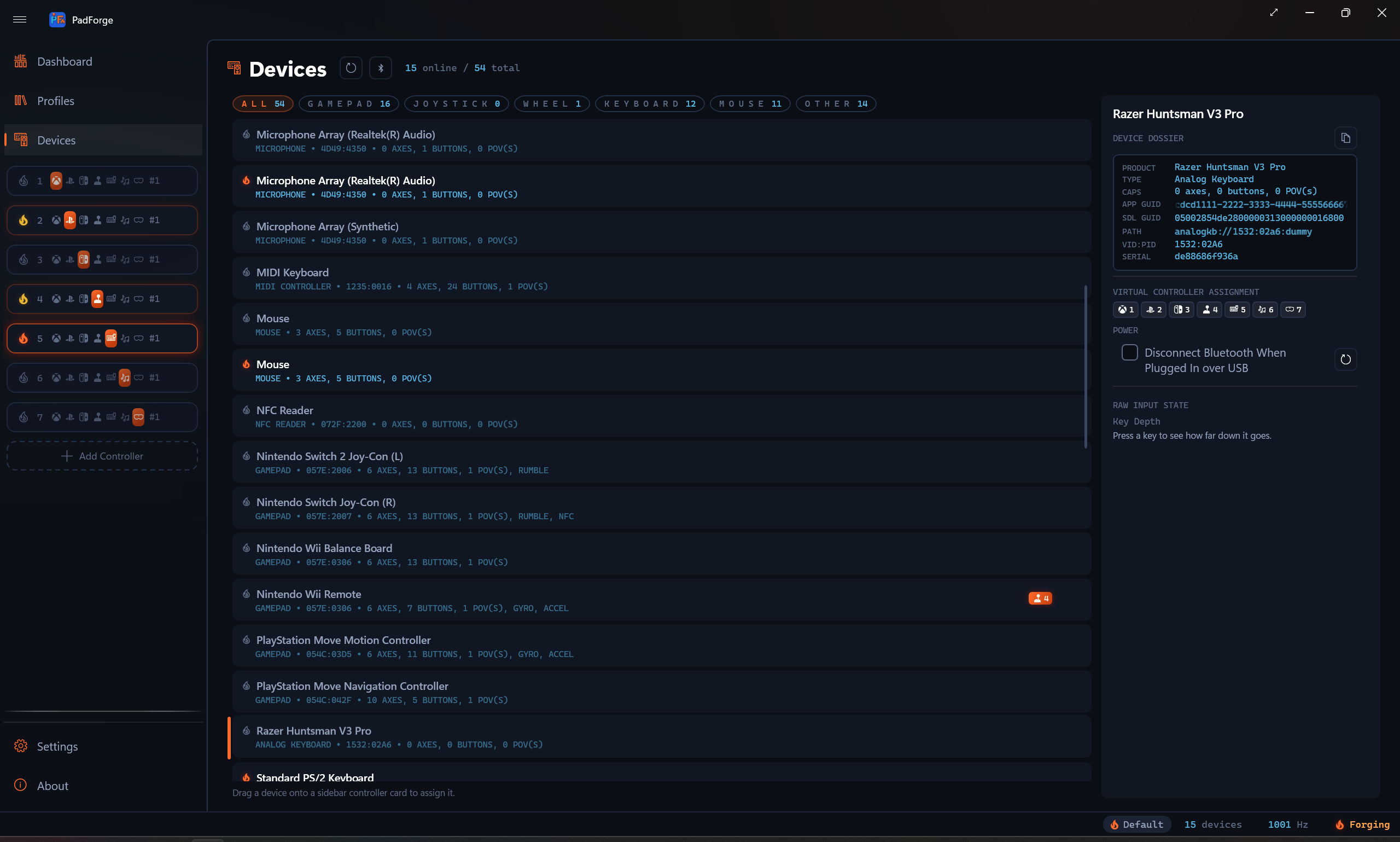
The row has no Hide from Games, Consume Mapped Inputs (Hooks) or Input Mode settings. It reads a vendor interface beside the keyboard, and hiding that interface would hide it from the keyboard's own software too, which a Razer keyboard needs before it reports any depth.
Mapping keys
Every key the keyboard can report is listed under its row in the input picker, named for the key's US legend: W, Spacebar, Left Shift. Keys with no US legend have names of their own:
| Name | Key |
|---|---|
| Fn | The Fn key, on the keyboards that report it |
| Intl # and Intl \ | The two ISO keys, next to Enter and next to Left Shift |
| Intl ¥, Intl Ro, Henkan, Muhenkan, Katakana/Hiragana | The Japanese keys |
| Hangul and Hanja | The Korean keys |
| Numpad = | The keypad equals key |
| Extra Key 1 to Extra Key 6 | Vendor keys: the Keychron lighting and Cortana keys, a second Fn key, and similar |
| Left Space, Right Space, Center Fn, Right Fn | The halves of a split space bar and the two Fn keys on a Wooting 60HE v2 or 80HE+, in addition to their Spacebar and Fn |
| Key 1 to Key 3 | The three keys of the SayoDevice O3C |
| Key Position 0 to Key Position 255 | Keys a keyboard reports only by where they sit, with no key map to name them |
Some keyboards identify keys only by position: the Redragon M68, E-YOOSO HZ-68 and Redragon K712, the Logitech PRO X TKL RAPID, MADLIONS boards without a recorded key table, libhmk keys with no standard key behind them, and the Fn key of the ASUS ROG Azoth 96 HE. On the Redragon, E-YOOSO and MADLIONS boards, and for the Azoth's Fn key, a key joins the picker the first time you press it. The Logitech lists its 256 keys from the start, A and D by name and the rest by position, and a libhmk keyboard lists every key in its keymap. Record is the quick way to map a key by position: press it past half travel. A keyboard shared over Remote Link lists the same keys on the other PC, the ones it has joined since included.
A key reads 0 at rest and full at the bottom of its travel. What that means depends on the target:
| Target | What the key does |
|---|---|
| Button | Presses once the key passes the row's Axis-to-Button Deadzone. The deadzone is the actuation point: 20% fires on a light touch, 100% only at the bottom. With Primary Mode set to Rapid Trigger, a short lift releases and a short push presses again. |
| Trigger | The depth is the pull, so a half-pressed key is a half-pulled trigger. |
| Stick axis | The depth pushes the stick toward one side. Invert pushes it the other way, so two keys drive one axis the way two buttons do. |
An analog key is never read through the (Any Device) group. Pick it under the keyboard's own row.
Soft press and full press
Two rows can read the same key at two deadzones. A row at 30% fires on a soft press, and a row at 90% fires only on a full press, so one key carries two actions.
For an action that fires on the soft press and lets go at the full press, put both depths on one row as two sources, 30% and 90%, and set the row's Combine to Only One. The row fires while exactly one of them is past its deadzone, which is the band between the two depths.
Rapid Trigger
Set a button row's Primary Mode to Rapid Trigger and the key releases as soon as it lifts by more than the row's Distance, then presses again as soon as it goes back down by more than that, without rising past the actuation point in between. Analog keyboards such as Wooting's do this in their firmware. In PadForge the row's deadzone stays the actuation point, and Distance defaults to 10 percent of the key's travel. A trigger row takes the mode too, so a key or a gamepad trigger can fire a controller game's trigger the same way. See Rapid Trigger.
Two characters from one keyboard
A keyboard assigns to any number of slots, like any device, so one keyboard can drive two controllers for split-screen games. To switch which character the keys move, give each slot a shift layer with a Toggle activator on the same key. On one slot the keys live on the base layer and the shift layer is empty, with Inherit Unmapped Targets from Base left off so the empty layer silences them. On the other slot it is the reverse. One press moves the keyboard from one character to the other.
Macros
Keys as macro triggers
Analog keys appear in a macro's Add from List dropdown under the keyboard, and Record Trigger picks up a key pressed past half travel. Each key entry on the trigger has its own Deadzone, the depth it fires at, so two macros on one key can be a soft press and a full press. See Macros.
Set Chroma Color
Set Chroma Color, in the Lightbar & LEDs group, paints the Razer devices assigned to the macro's virtual controller one color while the action runs, along with every other Razer device of the same kind. The analog row of a Razer keyboard or keypad lights as that device, so assigning the analog row to the virtual controller is enough. The color wins over every Lighting tab, and when the action ends the lighting goes back to the color a Lighting tab or a vendor row sets, or to Razer Synapse. Set Chroma Color says what it paints while Synapse is closed.
To hold a color for as long as the key is held, set the macro to While Held with Until Release and give the action a long Duration. When two macros paint at once, the one lower in the list wins. Put a full-press macro below its soft-press twin and the keys turn the full-press color at the bottom of the press and back to the soft-press color on the way up.
Assigned to a virtual controller, the analog row of a Razer, SteelSeries or Logitech keyboard that PadForge can light also gets the Lighting tab the keyboard's own row gets. See Mice, Keyboards and Vendor Rows.
Supported keyboards
PadForge reads every keyboard below. The families and how each one is read are in Analog Keyboards Internals.
| Brand | Models |
|---|---|
| AIM1 | MATATAKI (US) |
| AJAZZ | AK680 MAX HE, AK680MC, AK820 MAX RGB, ALUX60, ALUX68 AIR, ALUX68 PRO, NS67, NS67 PRO, NS87 |
| Akko | MOD007B V3 HE, MOD007S V3 HE, MOD 007 V5 HE, Ray68 HE, TAC75 HE |
| ANGRYSHARK | Final 75 |
| ANTGAMER | AGK75 PRO, AGK75 U2, AGK87 |
| ARDOR | GAMING Radiant |
| ASTROMEDA | AMGK80-001 |
| ASUS | ROG Azoth 96 HE |
| ATK | Hex80 (ATK x QK) |
| ATTACK SHARK | Beat75, K85, K85PROHE, R68HE, R82HE, R82PROHE, R85HE, R85Ultra, R86PROHE, R98GT, R98HE, R98PRO, R98ULTRA, X60 HE, X65, X65 Pro HE, X65HE, X68 Pro HE, X68HE, X68MAX, X68Ultra, X82 Pro HE, X82HE, X85Ultra, X87Ultra, X96HE, X98HE, X820pro |
| ATWO | GK7 MX |
| AULA | HERO84 HE, HERO 68 Air, HERO 68 HE, HERO 68 HE PRO, HERO 68 MINI, HERO 99 HE, KP-TE153, MINI 60 HE, MINI 60 HE MAX, MINI 60 HE Pro, WIN 60 HE, WIN 60 HE MAX, WIN 60 HE PRO, WIN 68 HE, WIN 68 HE PRO / MAX, WIN 68 HE Ultra |
| Blackstorm | Renegade HE |
| BOYI | H60 Pro |
| CAROTMAS | Mercury68, Mercury68 Pro |
| CHERRY | XTRFY K5 Pro TMR Compact |
| Chilkey | Slice75 HE |
| COLORFUL | QY98 Ultra |
| DARKFORCE | Fib(68) |
| DrunkDeer | A75, A75 ISO, A75 Pro, G60, G65, G75, G75 JIS |
| DSPIXEL | DS KEY, Magic 80 |
| E-YOOSO | HZ-68 |
| E7 | 68 PRO V2 |
| EDRA | EK368RT |
| EPOMAKER | G84 HE, G84 HE JIS, HE60 Lite, HE60 Wired, HE60 Wireless, HE65 Mag, HE68 Lite, HE68 Mag, HE75 Mag, HE75 V2, HE108 |
| EvoFox | Ronin HS65 |
| EWEADN | DEEP68 HE, DEEP68 Pro HE, DEEP80 HE (magnetic version), DEEP80 Max HE (magnetic version), DEEP80 Pro HE (magnetic version), DK63 HE, DK68 HE, DK68 Pro HE, DK68 Star HE / DK63 Star HE, DK68 V2 HE, DK75 E HE, DK75 HE, DK75 Pro HE, DK80 HE, ES68, ES68 EVO, ES68 Lite, Gamma75 HE (EXX collaboration), SEEK75, SMART 875 HE, V99 (magnetic version), X87HE, ZAP68 HE, ZAP68 SE, ZAP68 Ultra HE, ZAP87 HE |
| Finalmouse | Centerpiece Pro |
| FL ESPORTS | Blend HE, D75 HE, D98 HE, FL750 (magnetic version), Flame65S, GP75 HE, GP87 HE, MK870 HE, NX68 Pro, NX108, X80 HE |
| FREEWOLF | F68, F68 PRO |
| Fuego | GKB904 |
| Funbey | AST V68, Coke V68 |
| Fury | Kanabo K6 |
| G TUNE | GMK82 |
| GamaKay | NS68, NS75, TK75 HE, TK75 TMR |
| Game Arena | GKX68 MAGNUM |
| GAMEBOOSTER | RAPID HE |
| GAMEPOWER | Nexa HE60 1K, Tirus HE80 |
| GamePro | MK160B MAX |
| GravaStar | Mercury V75, Mercury V75 Lite, Mercury V75 Pro |
| HATOR | Skyfall 65 MAG Ultima 8K Wireless, Skyfall 65 MAG Ultra 8K, Skyfall 80 MAG Ultima 8K Wireless, Skyfall 80 MAG Ultra 8K |
| HAVIT | KB900L, KB904L |
| HAWK | Gaming HK550, Gaming HK610S |
| IDEEZ | SWIFT X85 |
| IDJ | H60HE |
| IPI | AURORA65, AURORA65W, Aurora75 PRO, Aurora 75, flash68, QBZ65, QBZ75, RAIN65 |
| IROK | Mars75 / Mars75 Pro, Mercury68 Max, Mercury68 SE (JingTai V2), MG68 Plus, MG75 Max, MG75 Pro, NA87 Mag, NA87 Pro, ND63, ND63 Ultra, ND68 Pro, RA68 |
| IYX | MU68 Pro |
| JEDEL | KL166 |
| JINGSU | KA67, KB98, KCC04A, KE87 |
| Keychron | K2 HE ANSI, K2 HE ISO, K2 HE JIS, K3 HE ANSI, K3 HE ISO, K3 HE JIS, K4 HE ANSI, K4 HE ISO, K4 HE JIS, K6 HE ANSI, K6 HE ISO, K6 HE JIS, K8 HE ANSI, K8 HE ISO, K8 HE JIS, K10 HE ANSI, K10 HE ISO, Q1 HE 8K ANSI, Q1 HE 8K ISO, Q1 HE 8K JIS, Q1 HE ANSI, Q1 HE ISO, Q1 HE JIS, Q2 HE ANSI, Q3 HE 8K ANSI, Q3 HE 8K ISO, Q3 HE 8K JIS, Q3 HE ANSI, Q3 HE ISO, Q3 HE JIS, Q4 HE ANSI, Q5 HE 8K ANSI, Q5 HE ANSI, Q5 HE ISO, Q5 HE JIS, Q6 HE 8K ANSI, Q6 HE ANSI, Q6 HE ISO, Q6 HE JIS, Q12 HE ANSI, Q12 HE ISO |
| Keydous | NJ68 Pro-CP, NJ80-CP V3 HE, NJ81-CP, NJ81-CP V3 HE, NJ98-CP, NJ98-CP V4 HE |
| KiiBOOM | Cybrix29 |
| Koda | A68 |
| KYSONA | KM82 HE |
| Lemokey | P1 HE ANSI, P1 HE ISO |
| libhmk firmware | Keyboards running the libhmk open firmware: HE16, HE60, HE60 v2 and M256 WHE |
| LinkerFoo | LF67R1 |
| Logitech | PRO X TKL RAPID |
| LOMZ | 75S |
| M4G | MAG 68 HE |
| MADLIONS | Fire 68, Fire 68 LL, Fire 68 Pro, Fire 68 Pro LL, Fire 68 Pro V2, Fire 68 Ultra, Fire 68 Ultra Limit, Fire 68 Ultra V2, Fire 68 V2, MAD60HE, MAD68HE, MAD68R, MAD 68 Pro, MAD 68 Pro R, MAD 68 R, Nano 68, Nano 68 Plus, Nano 68 Pro, Nano 68 Ultra |
| MageGee | AIR68, Captain87 JIS, MK-BOX (magnetic version) |
| MAMBASNAKE | M82 HE, X60 HE |
| MCHOSE | Jet 75, Mix87 III |
| MechLands | M75 |
| MEETION | Magic A68, Magic A75 |
| MICROPACK | K-68M |
| MonsGeek | FUN60 Pro, FUN68 HE, FUN75, M1 V5 HE, M1 V5 TMR, M2 V5 HE, M3 V5 HE |
| MSI | STRIKE 700 HE |
| Neo | Neo65 SONIC HE+ |
| Ninjadog | Varna Atlas |
| NOS | C800 ALU (UK) |
| Nova Gaming | GK505 Eon |
| NuPhy | Air60 HE, Air75 HE, BH65 HE, Field75 HE, Field75 HE V2, Gem80 HE, Halo65 HE, Halo65 HE Pro, WH80, WH80 (dongle) |
| Nyfter | Nyfboard HE 61K, Nyfboard HE 82K |
| Oniverse | Maegnus |
| OUSAID | HG68 HE |
| PIIFOX | DEFENDER 68, ER75 PRO |
| PSYCommu | PSY P1 |
| Rampage | KAISEL, ZENITH PRO |
| Razer | Huntsman Mini Analog, Huntsman Signature Edition, Huntsman V2 Analog, Huntsman V3 HE Magnetic Mini 65% 8KHz, Huntsman V3 HE Magnetic Tenkeyless 8KHz, Huntsman V3 Pro, Huntsman V3 Pro 8KHz, Huntsman V3 Pro Low-profile Tenkeyless 8KHz, Huntsman V3 Pro Mini, Huntsman V3 Pro Mini 8KHz, Huntsman V3 Pro Tenkeyless, Huntsman V3 Pro Tenkeyless 8KHz, Huntsman V3 Tenkeyless 8KHz, Tartarus Pro |
| Redragon | K617 HE BR, K617 HE US, K673RGB-M BR, K673RGB-M UK, K673WB-RGB-M US, K709 HE, K712 RGB-M, M68 |
| Royal Kludge | A72HE |
| ROYALAXE | X68 |
| SALPIDO | SHOT209 |
| SARU | KX69HE, KX78HE |
| SAVIO | ASTRAL |
| SayoDevice | O3C |
| Skyloong | GK61 HE, GK68 HE, GK75 HE |
| SteelSeries | Apex Pro, Apex Pro Gen 3, Apex Pro TKL |
| Sunsonny | N-J100 |
| Syntech | Chronos 68 |
| Titan Nation | Storm68, TITAN60 PCB, TITAN68HE |
| UluGames | Howl 75 |
| URX | Core68 HE |
| Valkyrie | VK 99 Gaming (Naruto), VK Mag68, VK Mag68 Max, VK Mag75, VK Mag75 Lite, VK Mag75 Max, VK Mag75 Pro, VK NB68, VK NB68 Max |
| Veekos | Shine60 HE |
| Womier | M68 HE Pro, SK61 HE, SK75 TMR |
| Wooting | Every Wooting keyboard with analog reporting, from the Wooting One and Two to the 60HE, 80HE and UwU |
| XINMENG | Beat65, Beat68, Beat75, X87 TMR, X98 V3 (magnetic version), Zero 68 |
| YUNZII | RT75 PRO |
Keyboards that send the 0xA0 depth event without being asked, the MCHOSE Jet 75 among them, are read by listening even when their model is not listed.
Limitations
- No analog keyboard has been read live by the maintainer. Every protocol was built from the open-source readers that already drive these keyboards and tested against byte captures built from them.
- A Razer keyboard or keypad reports depth only while Razer Synapse runs. The 8KHz Huntsmans report through the same interface as the V3 Pro, going by Razer's own web configurator, and no public capture yet shows one reporting a pressed key.
- Most keyboards share their configurator's channel. Close the configurator while PadForge reads them.
- The Logitech PRO X TKL RAPID reports only the key pressed furthest, so it reads one key at a time.
- The ASUS ROG Azoth 96 HE reports one key at a time too: the first key pressed past 0.10 mm, until it comes back up.
- Keys are named for their US legend, whatever layout Windows uses. A key remapped in the keyboard's own software keeps its factory name on some keyboards and takes its new one on others, the way each reference reads it.
Related pages
- Settings: the Input Engine card and its Read Analog Keyboards switch.
- Devices: the analog keyboard row and its Key Depth panel.
- Button and Axis Mappings: deadzones, Invert, and the Combine modes.
- Macros: trigger entries and the Set Chroma Color action.
- Analog Keyboards Internals: every protocol, for whoever has to change the code.
Last updated for PadForge 5.0.0.