Novint Falcon
A Novint Falcon through Force Dimension's SDK: the handle as a stick, the grip's four buttons as buttons, and a game's rumble and force feedback as force on the handle.
The Novint Falcon is a game controller whose handle moves in three dimensions and pushes back with three motors. With Drive Novint Falcon on, PadForge opens each Falcon through Force Dimension's library and gives it a row on the Devices page. PadForge computes the force on the handle about a thousand times a second, from where the handle is and what the game plays, so a game that has never heard of the Falcon still pushes back through it.
The two ways the handle can feel follow two community programs for the Falcon: FalconJoystick, where the handle is a self-centering joystick, and FalconJoyForce, where it aims like a mouse.
What it needs
- A Falcon with its power supply and USB cable.
- Force Dimension's SDK for Windows, from Force Dimension's download page. Novint's own software and drivers are no longer available, and Force Dimension's library loads the Falcon's firmware itself. PadForge loads the library you install and ships none of it.
- The x64 build of PadForge. Force Dimension's library is 64-bit x86 code, which the ARM64 build cannot load.
PadForge finds dhd64.dll in this order: a copy you chose with Choose dhd64.dll…, the folder the FDSDK environment variable names, the folder Force Dimension's installer recorded, each sdk-* folder under Program Files\Force Dimension or Program Files\ForceDimension, newest first, and System32, where the installer also puts a copy. A copy you choose takes over within a few seconds with no restart, and a Falcon open on another copy closes and opens again on it.
Turning it on
Open Settings, find the Novint Falcon card and tick Drive Novint Falcon. It is off by default. While the engine runs, the card says which library loaded, for example Force Dimension SDK 3.17.7, loaded from C:\Program Files\Force Dimension\sdk-3.17.7\bin\dhd64.dll.
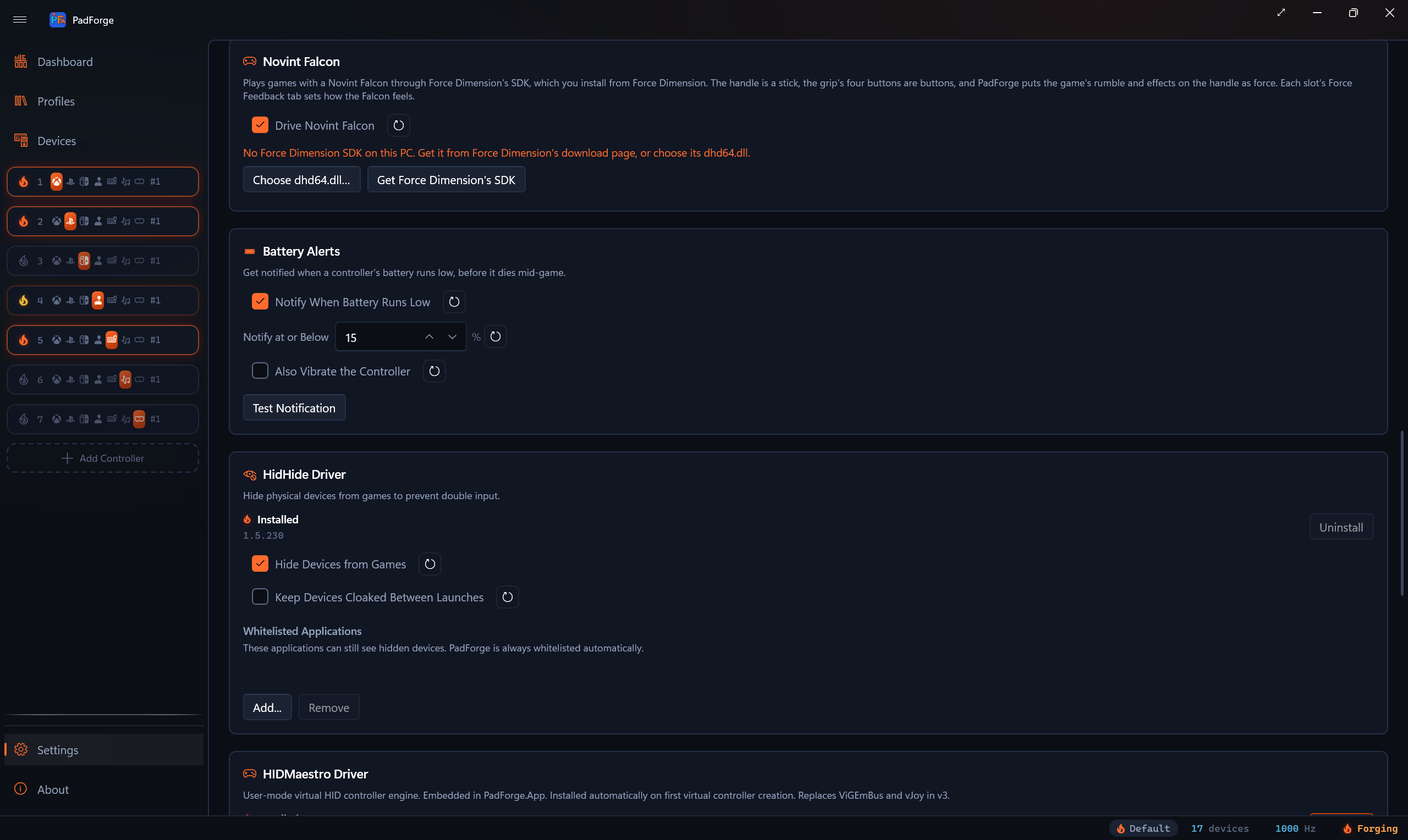
Each open Falcon gets a row on the Devices page, and the row's detail pane says how that Falcon is doing:
- Falcon 1234: pull the handle all the way out, then push it all the way in, to home it
- Falcon 1234: running at 1.0 kHz
The homing line shows for 20 seconds after a Falcon opens, then the rate Force Dimension's library reports. After power-up the Falcon has to be homed before its positions hold: pull the grip all the way out toward you, then push it all the way in.
An open Falcon belongs to PadForge alone. FalconJoyForce and Force Dimension's own tools cannot open it while Drive Novint Falcon is on, and a Falcon another program holds shows as open in another program. Turning the switch off closes every Falcon.
The driver
Force Dimension's installer puts its USB driver, which runs on Windows' WinUSB, in Windows' driver store, and Windows gives it to a Falcon when it is plugged in. When no Falcon opens, the card says why:
| Line | What to do |
|---|---|
| A Falcon is plugged in with no driver | Click Install Falcon Driver. It installs Force Dimension's package from the SDK folder onto the Falcon. Windows may first ask whether to trust Force Dimension. |
| The Falcon is on another driver (…) | PadForge leaves a device on another driver alone, such as Novint's old driver. In Device Manager, open the Falcon, choose Update driver, then Browse my computer for drivers, and pick the drivers\usb folder in the SDK folder. |
| The Falcon is on Force Dimension's driver, and Force Dimension's library could not open it: (…) | The driver is right. The line gives the library's own reason, then says to check the Falcon's power and its USB cable. |
| No Falcon found | Plug in its power and its USB cable. |
Install Falcon Driver shows only when the SDK folder holds the driver package with its signed catalog. When a copy you chose does not load, the card says The dhd64.dll you chose did not load, so PadForge uses the copy above., and the copy in use keeps its Falcons.
The row
The Falcon's row on the Devices page has three axes and four buttons:
| Input | Reads |
|---|---|
| Left/Right | The handle left and right, or in the Aim feel, the aim |
| Up/Down | The handle up and down, or the aim. Up reads at the low end, as a gamepad's stick does. |
| In/Out | The handle toward and away from you, out toward you at the high end |
| Button 1 to Button 4 | The grip's buttons, in Force Dimension's order |
The Devices page draws the handle as a dot in a square above the axes. The row answers no (Any Device) source, since a Falcon at rest reads centered on every axis.
Calibrate Reach
Calibrate Reach in the row's detail pane measures how far the handle travels. Move it to every edge of its reach during the four-second sweep, while the forces rest. Each axis takes 95% of half the distance it traveled as its reach, when that comes to between 25 and 120 mm. An axis outside that keeps its old reach. Until a sweep, the reach is 60 mm on every axis. Each Falcon keeps its own, by serial number, and every slot it feeds uses it. The line under the button gives the reach in use, or how the last sweep went. A sweep asked for on a Falcon that closed in the meantime ends at once and measures nothing.
On an Xbox or PlayStation slot, a Falcon maps the way @pobgithub's RumbleRoute firmware maps it: Left/Right and Up/Down on the right stick, and buttons 1 to 4 on the right trigger, the left trigger, the right bumper and the right stick's click. In/Out starts unmapped.
How it feels
A slot with a Falcon shows a Novint Falcon section on its Force Feedback tab. Each slot keeps its own settings, so a profile carries them per game.
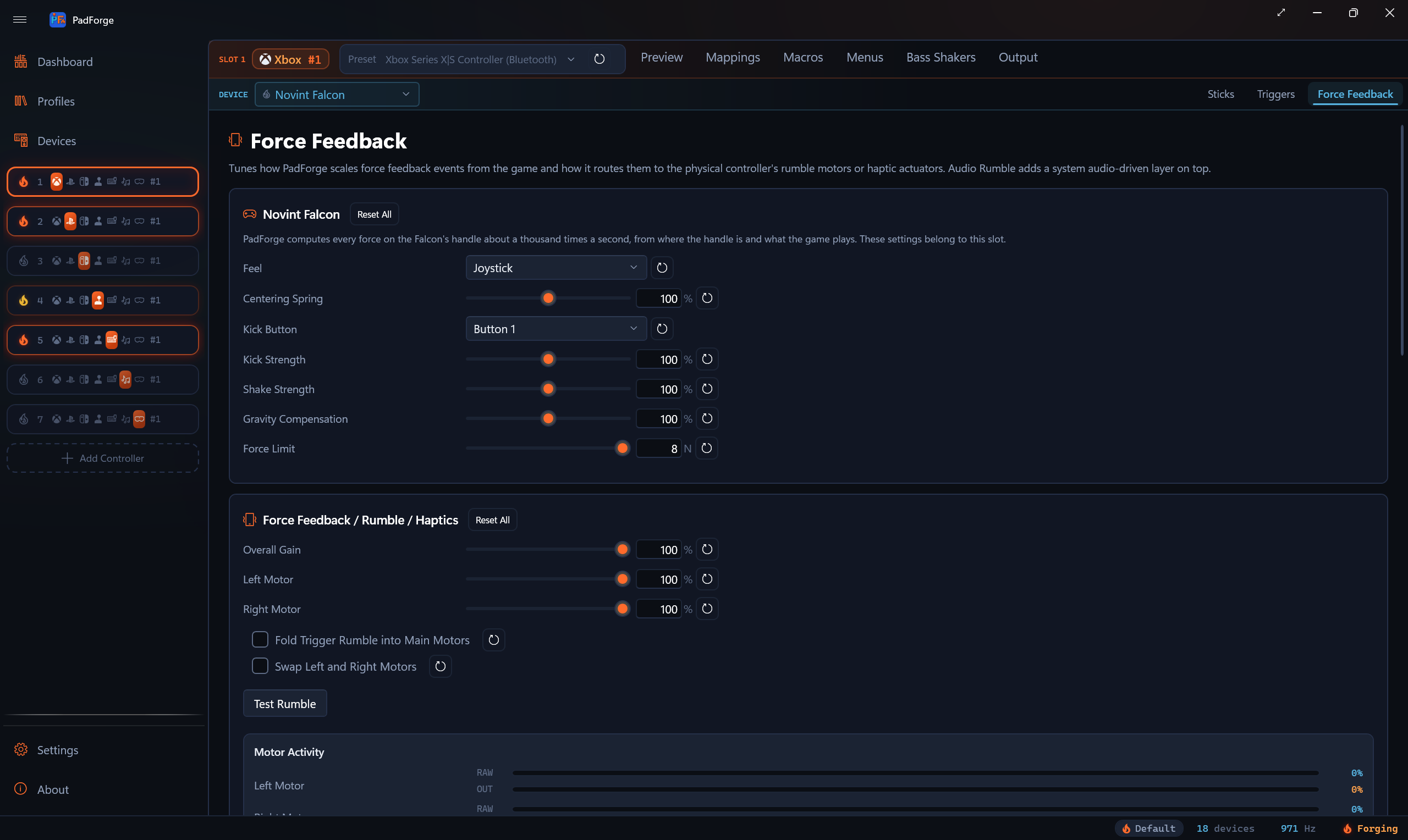
| Setting | Range | What it does |
|---|---|---|
| Feel | Joystick, Aim | See below |
| Centering Spring | 0 to 200% | The Joystick feel's spring, 3 N at full deflection at 100% |
| Kick Button | None, Button 1 to 4 | While it is held, and for a quarter second after, rumble kicks the handle toward you. Rumble at other times shakes it. Button 1 by default. |
| Kick Strength | 0 to 200% | The kick |
| Shake Strength | 0 to 200% | The shake |
| Brace Button | None, Button 1 to 4 | Aim only: while held, the aim slows to 30% for fine adjustments |
| Preload Button | None, Button 1 to 4 | Aim only: while held, a steady 1.6 N push loads the handle, which smooths small corrections |
| Gravity Compensation | 0 to 200% | How much of the handle's own weight the Falcon holds up |
| Force Limit | 1 to 8 N | The most force on the handle |
Joystick: the handle's position is the stick, full at 85% of the handle's reach, with the direction kept. A spring pulls the handle back to center, and past full deflection an end stop builds to 8 N. PadForge's stick dead zones and response curves apply on top, as on any stick.
Aim: the stick follows how fast the handle moves, like a mouse, through three speed zones. At very low speed it follows the handle's offset from where the handle was a moment before, so slow, fine aiming still moves the view. Holding the handle against its edge, past 81% of its reach, keeps turning in the nearest of the four directions until the handle comes back inside 76%. A wall from 78% to 95% of the reach marks the edge, with a ridge just before the turning border and a small nudge on the way back in.
A game's force
Rumble reaches the Falcon after the tab's Overall Gain, Left Motor, Right Motor, Swap Left and Right Motors and Fold Trigger Rumble into Main Motors, as it reaches any controller. Overall Gain then scales the kick, the shake and the effects below.
- The kick is 8 N at full rumble and at least 4.5 N, held while the rumble keeps coming, and it fades faster after a weak shot than after a strong one.
- The shake wanders in direction every 140 milliseconds and runs between 3.2 and 9 N, under the 7.8 N cap on the handle's left/right and up/down force.
A game that plays force feedback effects, on a slot whose preset takes them, reaches the handle too:
- A constant force, a ramp or a periodic effect pushes the handle away from the direction it comes from, the way SDL and USB force feedback devices define direction. An effect from the right pushes the handle left.
- A spring, damper, friction or inertia acts on Left/Right and Up/Down around its center. A game's spring takes the Joystick feel's spring's place while it plays.
A Falcon in no slot holds itself up and does nothing else. Every force fades in over half a second when a Falcon opens, when its slot takes it, and when its feel changes, so a spring never snaps a handle nobody is holding. Stopping the engine closes every Falcon at zero force. A Falcon whose forces or gravity compensation will not turn on, or whose force writes fail three times in a row, closes, and PadForge opens it again on its next look.
A Falcon shared over Remote Link feels the game on the other PC, with the feel set on that PC's virtual controller page, when both PCs run 5.2.0 or later. With an older PC on either end, it gets no force from the other PC.
See the technical page, Novint Falcon Internals.
Last updated for PadForge 5.2.0.