3D Model System
Renders interactive Xbox, PlayStation, Nintendo, and Valve controller models from Wavefront OBJ meshes using HelixToolkit.WPF. The loader, view, and animation code are adapted from Handheld Companion (CC BY-NC-SA 4.0), as are the Xbox 360 and Steam Deck meshes. Both Steam Controller bodies are meshed from Valve's own published CAD. The Xbox Series, DS4, DualSense, Edge, and Switch 2 Pro families run on purchased hado CGTrader meshes split per-part, with per-colorway texture atlases.
Valve's CAD is CC BY-NC-SA 4.0, Copyright Valve Corporation. PadForge is not associated with or endorsed by Valve.
Namespace: PadForge.Models3D (model classes), PadForge.Views (view)
Architecture Overview
ControllerModelBase (abstract)
    |
    +-- ControllerModelXbox360        (HC mesh, flat plastic colors)
    +-- ControllerModelXboxSeries     (Series mesh, 13 colorways; also serves
    |                                  Xbox One / Elite / Adaptive profiles)
    +-- ControllerModelDS4            (DualShock 4 mesh, 2 colorways)
    +-- ControllerModelDualSense      (DualSense mesh, 10 colorways)
    |     |
    |     +-- ControllerModelDualSenseEdge  (Edge asset folder, own family)
    +-- ControllerModelSwitch2Pro     (Switch 2 Pro mesh; also serves the
    |                                  original Switch Pro profile)
    +-- ControllerModelSteamDeck         (Handheld Companion per-part OBJs)
    +-- ControllerModelSteamController   (2015 Steam Controller, Valve STEP)
    +-- ControllerModelSteamController2  (2026 Steam Controller, Valve STEP)

ControllerModelView (UserControl)
    |
    +-- HelixViewport3D          (3D rendering viewport)
    +-- ModelVisual3D            (hosts the model3DGroup scene graph)
    +-- CompositionTarget.Rendering  (per-frame visual updates)
Model classes own geometry and materials. The view class owns the viewport, input handling, and animation.
ControllerModelBase.Create(family, appearance, extraControls) is the one construction path. ControllerModelView.EnsureModel() calls it and assigns the result to ModelVisual3D.Content, and the interaction tests call it too, so the two cannot drift. It ends in EnsureHighlightMaterials(), because a model reaching the viewport with no glow materials is the defect that path exists to prevent.
ControllerModelBase
File: PadForge.App/Models3D/ControllerModelBase.cs
Abstract base class. Each subclass defines its own meshes, colors, and rotation points.
Data Dictionaries
| Field | Type | Description |
|---|---|---|
ButtonMap |
Dictionary<string, List<Model3DGroup>> |
PadSetting name to Model3DGroups for highlighting (supports multi-mesh buttons like button + overlay). |
ClickMap |
Dictionary<Model3DGroup, string> |
Model3DGroup to PadSetting name for hit-test click-to-record. Reverse of ButtonMap. |
DefaultMaterials |
Dictionary<Model3DGroup, Material> |
Original material per group. Restored after highlight/flash. |
HighlightMaterials |
Dictionary<Model3DGroup, Material> |
Accent-colored material per group. Applied on press or flash. |
QuadrantMap |
Dictionary<Model3DGroup, string[]> |
Surfaces whose hover resolves by quadrant instead of as one target. Four names in up, down, left, right order, in model space (X across the face, +Z toward its top edge). See Quadrant surfaces. |
StickRiders |
Dictionary<Model3DGroup, List<Model3DGroup>> |
Parts that lean with a stick without lighting with it, keyed on that stick's ring. Tilting and glowing are different sets: the Steam Deck's stem has to lean with the cap and must not light, because the glow belongs on the base. |
Scene Graph
| Field | Type | Description |
|---|---|---|
model3DGroup |
Model3DGroup |
Root scene group containing all child meshes. Assigned to ModelVisual3D.Content. |
ModelName |
string |
Embedded-resource folder. "XBOX360" or "Switch2Pro" for the single-appearance families, "{family}.{appearance}" for the rest ("DS4.JetBlack", "DualSense.White", "DualSenseEdge.Edge", "XboxSeries.Carbon"). |
ModelFamily |
string |
Everything before the first . in ModelName, or ModelName when there is no dot. The identity EnsureModel() compares against, so a colorway swap does not read as a family swap. |
Touchpad |
Model3DGroup |
First touch surface, or null on models without one. DS4 points it at Screen.obj, DualSense at Touchpad.obj, every Valve model at LeftPadTouch.obj. |
TouchpadRight |
Model3DGroup |
The second touch surface, on a pad that has two. Null on a one-pad model, where both fingers ride Touchpad. Every Valve model sets it, and the split matches the frame packers: finger 0 is the left pad, finger 1 the right. |
TouchParts0, TouchParts1 |
virtual Model3DGroup[] |
The parts whose front faces make up each pad. One mesh on nearly every model. The 2015 Steam Controller overrides both, because each of its pads is four direction quarters around a center disc and the disc alone is 40% of the pad. The 2026 pad overrides them to point at {side}PadFace.obj rather than the whole assembly. |
TouchpadSurface0, TouchpadSurface1 |
TouchSurface |
The fitted face of each pad: center, normal, in-plane axes, extents, and a radius for a round pad. Lazily measured from TouchParts. See Touch surfaces. |
RiderDecals |
HashSet<GeometryModel3D> |
Decal geometries appended into a moving host group. The view masks its accent overlay by the rider's own texture alpha for these. |
CoveringRiderDecals |
HashSet<GeometryModel3D> |
Riders whose art covers the whole host face (the Xbox guide emblem). Highlight tints the rider's own texels instead of hiding it. |
Scale and Touchpad Insets
| Member | Default | Description |
|---|---|---|
ModelScale |
1.0 |
Uniform scale applied at the host ModelVisual3D, not on model3DGroup, so the finger-sphere sibling visuals scale with the mesh. |
TouchpadXInsetFrac |
0.03 |
Fractional inset cropping the Touchpad mesh bounds to the real touch-sensitive width. |
TouchpadZTopInsetFrac |
0.12 |
Top inset. |
TouchpadZBottomInsetFrac |
0.12 |
Bottom inset. |
The defaults match the DS4 Screen.obj. DualSense overrides all three and ModelScale. Switch 2 Pro overrides ModelScale only. Every Valve model sets all three insets to zero, because its pad meshes are the measured touch face with no bezel left to crop, and each overrides ModelScale.
ModelScale brings a model's authoring size to the framing the fixed camera expects, against the Xbox 360 mesh at 151.45 mm across:
| Model | Body width | ModelScale |
|---|---|---|
| Steam Controller (2015) | 161.17 mm | 151.45 / 161.17 |
| Steam Controller (2026) | 158.70 mm | 151.45 / 158.70 |
| Steam Deck | 298.30 mm | 151.45 / 298.30 |
Common Geometry Groups
| Field | Loaded From | Description |
|---|---|---|
MainBody |
MainBody.obj |
Main controller body mesh |
LeftThumb |
LeftStickClick.obj |
Left stick click mesh |
LeftThumbRing |
Joystick-Left-Ring.obj |
Left stick ring mesh (torus) |
RightThumb |
RightStickClick.obj |
Right stick click mesh |
RightThumbRing |
Joystick-Right-Ring.obj |
Right stick ring mesh (torus) |
LeftShoulderTrigger |
Shoulder-Left-Trigger.obj |
Left shoulder trigger mesh |
RightShoulderTrigger |
Shoulder-Right-Trigger.obj |
Right shoulder trigger mesh |
LeftMotor |
MotorLeft.obj |
Left rumble motor mesh |
RightMotor |
MotorRight.obj |
Right rumble motor mesh |
MainBody.obj is the only mandatory file. Everything else here loads through TryLoadModel and stays null when absent, for the same reason the button table does: a pad that does not have the control does not ship the mesh. The 2015 Steam Controller has one stick and no separate ring solid, its bezel being a hole in the case rather than a part.
Rotation Parameters
| Field | Type | Description |
|---|---|---|
JoystickRotationPointCenterLeftMillimeter |
Vector3D |
Left stick tilt pivot |
JoystickRotationPointCenterRightMillimeter |
Vector3D |
Right stick tilt pivot |
JoystickMaxAngleDeg |
float |
Max stick tilt angle (degrees) |
ShoulderTriggerRotationPointCenterLeftMillimeter |
Vector3D |
Left trigger rotation pivot |
ShoulderTriggerRotationPointCenterRightMillimeter |
Vector3D |
Right trigger rotation pivot |
TriggerMaxAngleDeg |
float |
Max trigger depression angle (degrees) |
UpwardVisibilityRotationAxisLeft/Right |
Vector3D |
Shoulder visibility correction axis |
UpwardVisibilityRotationPointLeft/Right |
Vector3D |
Shoulder visibility correction origin |
ButtonFileMap
Maps Handheld Companion .obj filenames (using ButtonFlags enum names) to PadSetting property names (used by the recording system).
protected static readonly Dictionary<string, string> ButtonFileMap = new()
{
    { "B1.obj", "ButtonA" },
    { "B2.obj", "ButtonB" },
    { "B3.obj", "ButtonX" },
    { "B4.obj", "ButtonY" },
    { "L1.obj", "LeftShoulder" },
    { "R1.obj", "RightShoulder" },
    { "Back.obj", "ButtonBack" },
    { "Start.obj", "ButtonStart" },
    { "Special.obj", "ButtonGuide" },
    { "DPadUp.obj", "DPadUp" },
    { "DPadDown.obj", "DPadDown" },
    { "DPadLeft.obj", "DPadLeft" },
    { "DPadRight.obj", "DPadRight" },
    { "LeftStickClick.obj", "LeftThumbButton" },
    { "RightStickClick.obj", "RightThumbButton" },
};
Constructor Flow (Model Loading)
Steps are order-dependent:
- Set ModelName and derive ModelFamily.
ModelNameis the embedded-resource folder, chosen byHMaestroProfileCatalog.ResolveAssetFoldersagainst the slot'sProfileIdandOutputType, plus the pad's colorway for the families that have one.ModelFamilyis the part before the first dot. - Load common geometry via
LoadModel(): MainBody, stick rings, motors, triggers. - Register trigger ClickMap entries:
LeftShoulderTrigger->"LeftTrigger",RightShoulderTrigger->"RightTrigger". Triggers use ClickMap (not ButtonMap) because they are continuous axes, not toggle buttons. - Iterate ButtonFileMap: Calls
TryLoadModel()per entry, thenRegisterButton()to populate bothButtonMapandClickMap. Special cases:LeftStickClick.objandRightStickClick.objalso setLeftThumb/RightThumbreferences for tilt animation. - Register each stick's cap as a quadrant surface.
RegisterQuadrants(LeftThumbRing ?? LeftThumb, ...)puts the cap inQuadrantMapunder the four axis directions, and the same for the right side. A pad with no separate cap solid falls back to its click mesh, so every stick has a direction target whatever its mesh split looks like. - Add all parts to
model3DGroup.Children. Assigned toModelVisual3D.Content. - Subclass constructor continues. Loads extra meshes, applies texture atlases or flat colors, calls
DrawAccentHighlights(), then attaches rider decals and adds the static decal and transparent overlays last.
The stick button does not own the cap. Step 5 used to append the ring into ButtonMap["LeftThumbButton"] instead, so pressing or hovering the click lit the whole stick and the two controls a stick carries read as one. The Steam Deck showed it plainly, its cap and its collar being separate solids. The button now glows its own click mesh. Physical deflection still grades cap and body together in UpdateJoystick, which is a different signal.
A cap that is in QuadrantMap alone reads as directions edge to edge. A cap that is also in ClickMap splits by radius: the outer half is a direction and the middle stays the click (IsOuterCapHit).
RegisterButton
Adds group to ButtonMap[padSettingName] (creates list if needed) and sets ClickMap[group] = padSettingName. This bidirectional mapping enables highlighting (name -> groups) and click detection (group -> name).
Quadrant surfaces
protected void RegisterQuadrants(Model3DGroup group, string up, string down, string left, string right)
protected void RegisterDirection(Model3DGroup group, string target)
RegisterQuadrants writes the four names into QuadrantMap in up, down, left, right order. Four consumers read it: the hover wedge, the recording ring overlay, the recording arrow, and the flash resolver. All four used to parse target names for "AxisX" and a "Left" prefix, which could never serve a pad whose quadrants are D-pad directions.
RegisterDirection is for a group whose whole surface is one direction, the way a D-pad key is. It goes into ClickMap only. Hover and click-to-record resolve through that map, while ButtonMap drives the per-frame press glow, and an axis direction has no pressed state to drive it with.
Two rules that a new mesh set has to satisfy:
- Every quadrant target must survive
NintendoPreviewMap.ToRaw(target, profileId), or clicking it records nothing. A hat-encoded D-pad resolves toRawPov0Upand its siblings. - A group that leaves
ButtonMapalso leavesPaintTarget's reach.EveryQuadrantSurfaceIsPaintedAndCanGlowinPadForge.Tests/ControllerModel3DHoverTests.cscatches the unpainted result, which renders in the OBJ loader's default yellow.
The wedge builder is for tori only. BuildClippedQuadrantMesh offsets each clipped point away from a skeleton circle at the part's own center, which suits a torus exactly. Every stick cap in this tree is one: hollow to 0.49 of its radius on the Xbox 360, 0.66 on the 2026 Steam Controller, 0.74 on the Steam Deck. A direction surface that is not a torus gets its own mesh instead. The 2015 Steam Controller's pads are 42 mm bowls 7.6 mm deep, where the torus offset drove half of each face sideways across the bowl rather than off it, so tools/steam_controller_2015_mesh.py quarters each pad face on its two diagonals and emits every quarter as its own mesh.
When one model's wedge looks wrong and the rest look right, the defect is in that model's asset. The shared builder was changed four times chasing the 2015 pad's solid dome cap, each change degraded pads that were already correct, and it was restored verbatim. The mesh tool splits the dome at 0.55 of its radius into a ring and a middle instead.
Touch surfaces
public readonly struct TouchSurface   // Center, Normal, AxisU, AxisV, ExtentU, ExtentV, Radius
public Point3D At(double u, double v, double lift)
protected static TouchSurface MeasureTouchSurface(Model3DGroup[] parts)
A pad's touchable face: where it sits, which way it faces, and how far it runs across and up its own plane. An axis-aligned bounding box cannot describe one. Every Valve pad is canted, the 2026's by 15 degrees off the controller's front and the 2015's by 19, so a point placed on the box lands beside the pad and the box's corners reach past the pad's outline entirely.
MeasureTouchSurface takes the outward-facing triangles for a rough normal, keeps the ones lying within 5 mm of the frontmost point along it, and re-fits. That 5 mm separates a face from its mounting: the 2026's pad mesh runs 38 mm deep and its front face is a 3 mm slab carrying 1775 of the 1800 outward-facing triangles, with the boss more than 20 mm behind. All three Valve faces come out flat to half a millimeter. The axes are built from the normal rather than fitted, so they cannot come out arbitrary: U is the normal crossed with the model's up, which points to the controller's right, and V is U crossed back.
Radius is set for a round pad and clamps At() to the disc, so a finger dot cannot travel into a corner the pad does not have.
Painting
protected void Paint(Model3DGroup group, Material material)
protected void PaintTarget(string padSettingName, Material material)
Paint applies a material AND registers it in DefaultMaterials. PaintTarget does the same for every group under a ButtonMap name. Applying without registering leaves the part HelixToolkit-default yellow again the moment a press or hover restores it. ExtendedPreviewRoutingTests.EveryValveModelConstructs fails the build if any drawn part lacks a resting material.
DrawAccentHighlights
Creates accent-colored DiffuseMaterial for all children. Reads the SystemAccentColorPrimary resource (a WPF-UI theme Color) and wraps it in a SolidColorBrush. Falls back to #FF6B2C ember orange. The brush stays solid because GradientHighlight() lerps its Color. AccentButtonBackground became an ember gradient in #175, so the highlight now derives from the accent Color instead. Called at the end of each subclass constructor.
Embedded Resource Loading
protected Model3DGroup LoadModel(string filename)     // Throws FileNotFoundException
protected Model3DGroup TryLoadModel(string filename)  // Returns null on failure
Loads .obj meshes from embedded resources via HelixToolkit's ObjReader. Searches manifest resource names by suffix (.{ModelName}.{filename}) to handle MSBuild digit-prefix mangling.
MSBuild mangling: 3DModels becomes _3DModels in resource names because MSBuild prefixes digit-leading folder names. Suffix matching avoids hard-coding the prefix.
string suffix = $".{ModelName}.{filename}";
foreach (var name in assembly.GetManifestResourceNames())
    if (name.EndsWith(suffix, StringComparison.OrdinalIgnoreCase))
        // Found it
Texture and Decal Helpers
protected Material LoadTexturedMaterial(string filename, double opacity = 1.0)     // flat gray fallback
protected Material TryLoadTexturedMaterial(string filename, double opacity = 1.0)  // null when absent
protected static Material AddGloss(Material baseMaterial, double intensity, double power)
protected void AttachRiderDecal(Model3DGroup host, string filename, Material material, bool covering = false)
protected static void ApplyMaterial(Model3DGroup group, Material material)
TryLoadTexturedMaterial loads a PNG atlas by the same suffix search, decodes it from a MemoryStream that outlives BeginInit/EndInit, and wraps it in a frozen DiffuseMaterial over an ImageBrush. ViewportUnits must be Absolute: the default RelativeToBoundingBox remaps the image onto each mesh's texcoord bounding box, which would render the whole atlas squeezed onto every part's own UV island.
AddGloss wraps a material in a MaterialGroup with a SpecularMaterial on top. DiffuseMaterial has no specular term, so a semi-transparent diffuse layer renders as a flat tint and clear ABXY shells read as no shell at all.
AttachRiderDecal loads a decal mesh and moves its GeometryModel3D children into the host group so they travel with it. Trigger labels rotate with a pulled trigger, stick-cap knurl art deflects with the stick. A missing file is a no-op, so a colorway without a given rider stays valid. covering: true also records the geometry in CoveringRiderDecals.
ApplyMaterial paints every GeometryModel3D in a group, front and back. ControllerModelXbox360 and ControllerModelSwitch2Pro instead keep a private SetMaterial that paints only Children[0].
Dispose Pattern
Clears all dictionaries and model3DGroup.Children. Standard dispose pattern with finalizer. Called by EnsureModel() when switching model types.
ControllerModelXbox360
File: PadForge.App/Models3D/ControllerModelXbox360.cs
Calls base("XBOX360").
Xbox 360-Specific Mesh Groups
| Field | Loaded From | Description |
|---|---|---|
MainBodyCharger |
MainBody-Charger.obj |
Battery pack/charger compartment |
SpecialRing |
SpecialRing.obj |
Guide button ring |
SpecialLED |
SpecialLED.obj |
Guide button LED indicator |
LeftShoulderBottom |
LeftShoulderBottom.obj |
Left bumper bottom piece |
RightShoulderBottom |
RightShoulderBottom.obj |
Right bumper bottom piece |
B1Button |
B1Button.obj |
A button colored overlay |
B2Button |
B2Button.obj |
B button colored overlay |
B3Button |
B3Button.obj |
X button colored overlay |
B4Button |
B4Button.obj |
Y button colored overlay |
Color Palette
| Name | Hex | Usage |
|---|---|---|
ColorPlasticBlack |
#707477 |
Default for most parts |
ColorPlasticWhite |
#D4D4D4 |
Main body, motors, shoulder bottoms |
ColorPlasticSilver |
#CEDAE1 |
Guide button |
ColorPlasticGreen |
#7cb63b |
A button |
ColorPlasticRed |
#ff5f4b |
B button |
ColorPlasticBlue |
#6ac4f6 |
X button |
ColorPlasticYellow |
#faa51f |
Y button |
Face button overlays (B1Button–B4Button) use transparent variants (Alpha = 150) so the base button color shows through.
Rotation Points
| Parameter | Value |
|---|---|
JoystickRotationPointCenterLeftMillimeter |
(-42.231, -6.10, 21.436) |
JoystickRotationPointCenterRightMillimeter |
(21.013, -6.1, -3.559) |
JoystickMaxAngleDeg |
19.0 |
ShoulderTriggerRotationPointCenterLeftMillimeter |
(-44.668, 3.087, 39.705) |
ShoulderTriggerRotationPointCenterRightMillimeter |
(44.668, 3.087, 39.705) |
TriggerMaxAngleDeg |
16.0 |
Material Assignment Order
- Face button overlays (
B1Button–B4Button) get transparent color materials and register intoButtonMapalongside base meshes for joint highlighting. SpecialLEDgets green transparent material.- Base face buttons (
B1.obj–B4.obj) get opaque color materials. - Guide button gets silver material.
- White parts:
MainBody,LeftMotor,RightMotor,LeftShoulderBottom,RightShoulderBottom. - Remaining parts default to black.
DrawAccentHighlights()called last.
ControllerModelDS4
File: PadForge.App/Models3D/ControllerModelDS4.cs
public class ControllerModelDS4 : ControllerModelBase
public ControllerModelDS4(string appearance = "JetBlack")
Calls base($"DS4.{Validate(appearance)}"). The mesh is the purchased hado model, classified into the Handheld Companion part names by spatial containment against the HC stand-in, sticks split at the cap cut.
Appearances
| Id | Name |
|---|---|
JetBlack |
Jet Black |
MagmaRed |
Magma Red |
An unrecognized id falls back to AppearanceIds[0] (JetBlack).
DS4-Specific Mesh Groups
| Field | Loaded From | Description |
|---|---|---|
LeftShoulderMiddle |
Shoulder-Left-Middle.obj |
Left shoulder middle piece |
RightShoulderMiddle |
Shoulder-Right-Middle.obj |
Right shoulder middle piece |
Screen |
Screen.obj |
Touchpad surface |
MainBodyBack |
MainBodyBack.obj |
Back panel |
AuxPort |
Aux-Port.obj |
Auxiliary port |
Triangle |
Triangle.obj |
Decorative triangle element |
DecalOverlay |
Decal.obj |
Static glyph and label overlay, added last |
Materials
Two atlases per colorway: Body.png for every solid part, Decal.png for the art. There is no flat color palette. MaterialBody paints every ButtonMap group first, then every remaining child of model3DGroup, then DrawAccentHighlights() runs.
Rider Decals
The face-button symbols (B1-Symbol.obj through B4-Symbol.obj) are decal art: their UVs address the decal atlas, not the body atlas. Giving them the body material skinned the buttons with whatever the body atlas holds at those coordinates. They attach as riders into their own button groups, so a press moves and lights the symbol with the button. Decal-Shoulder-Left/Right-Trigger.obj ride the triggers, Decal-L1.obj / Decal-R1.obj ride the bumpers so the lettering glows with a bumper press instead of staying gray in the static overlay.
The constructor also asks for d-pad arrow riders (DPadUpArrow.obj and siblings) and stick-ring knurl riders (Decal-Joystick-Left/Right-Ring.obj). Neither DS4 colorway folder ships those files, so AttachRiderDecal no-ops on them. That art comes from the body and decal atlases instead.
Touchpad Mapping
The DS4 exposes Screen.obj as Touchpad and registers ClickMap[Screen] = "TouchpadClick", so the surface is a click-to-record hit target. Touchpad is the base-class property the view reads for the touchpad click highlight and finger-sphere preview. DS4 does not override the touchpad inset fractions, so the view uses the defaults (TouchpadXInsetFrac = 0.03, TouchpadZTopInsetFrac = 0.12, TouchpadZBottomInsetFrac = 0.12).
Rotation Points
| Parameter | Value |
|---|---|
JoystickRotationPointCenterLeftMillimeter |
(-25.5, -5.086, -21.582) |
JoystickRotationPointCenterRightMillimeter |
(25.5, -5.086, -21.582) |
JoystickMaxAngleDeg |
19.0 |
ShoulderTriggerRotationPointCenterLeftMillimeter |
(-38.061, -0.34, 18.59) |
ShoulderTriggerRotationPointCenterRightMillimeter |
(38.061, -0.34, 18.59) |
TriggerMaxAngleDeg |
16.0 |
ModelScale |
1.0 (161 mm body width, real-world scale) |
The trigger hinge sits a third of the way up the part, by the Xbox One model's fraction of the trigger bounds, not at its top edge. Pinned at the top the paddle swept backwards into the bumper instead of swinging.
ControllerModelXboxSeries
File: PadForge.App/Models3D/ControllerModelXboxSeries.cs
public class ControllerModelXboxSeries : ControllerModelBase
public ControllerModelXboxSeries(string appearance = "Carbon", bool enableShare = true)
Calls base($"XboxSeries.{Validate(appearance)}"). Purchased hado CGTrader mesh, split per-part: 33 shells classified, the hybrid d-pad disc bisected into four wedges, sticks neck-split into cap-head ring groups and stem/base click groups.
This class replaced ControllerModelXboxOne, which no longer exists. Xbox One, Elite, and Adaptive profiles now render this mesh too, because it is the better model and the shapes are close enough. Their 2D layouts still diverge, which is why ResolveAssetFolders returns ("XBOXONE", "XboxSeries") for them.
Appearances
Thirteen colorways share the mesh: Carbon Black, Robot White, Electric Volt, Daystrike Camo, Halo Infinite, Starfield, Stellar Shift, Deep Pink, Porsche 75th Anniversary, Velocity Green, Pulse Red, Shock Blue, Remix Special Edition. Ids are AppearanceIds, display strings are AppearanceNames. An unrecognized id falls back to Carbon.
Series-Specific Mesh Groups
| Field | Loaded From | Description |
|---|---|---|
ShareButton |
Share.obj |
Share button |
DecalOverlay |
Decal.obj |
Static glyph overlay, puffed 0.22 mm at export |
TransparentTrim |
Transparent.obj |
Clear ABXY domes, loaded with TryLoadModel |
Share Button Wiring
The constructor takes a bool enableShare. The view passes true only when ProfileId starts with xbox-series-. Xbox One, Elite, and Adaptive profiles get false, and the Share mesh stays inert: visible body geometry, no hover, no click, no accent highlight. HM silently drops the Share bit on non-Series profiles, so the mapping UI does not surface it either.
Materials
Body.png for the solid parts, Decal.png for the art, Transparent.png for the clear plastic. The transparent material runs through AddGloss(…, 0.60, 40.0) because flat diffuse left the ABXY shells barely there. Two fallbacks guard colorways that merged their trim into the body: a missing Transparent.png samples Body.png at 30 % opacity, and Transparent.obj loads through TryLoadModel so a missing mesh is skipped instead of throwing. All thirteen shipped colorways carry both files today, so neither fallback currently fires.
Rider decals: knurl rings onto the stick cap-head groups, dotted grip panels onto the triggers and bumpers, and Decal-Special.obj onto the guide button as a covering rider, so a guide press tints the emblem's own texels accent while the button keeps its default material. Starfield alone ships Transparent-Shoulder-Left/Right-Trigger.obj, clear trigger shells that ride the trigger groups so they rotate with the pull. On every other colorway those two calls are no-ops.
Rotation Points
| Parameter | Value |
|---|---|
JoystickRotationPointCenterLeftMillimeter |
(-39.6, -18.0, 21.4) |
JoystickRotationPointCenterRightMillimeter |
(20.0, -18.0, -3.0) |
JoystickMaxAngleDeg |
14.0 |
ShoulderTriggerRotationPointCenterLeftMillimeter |
(-43.9, -3.29, 40.15) |
ShoulderTriggerRotationPointCenterRightMillimeter |
(43.9, -3.29, 40.15) |
TriggerMaxAngleDeg |
12.0 |
ModelScale |
1.0 (155.3 mm body width, real-world scale) |
Draw Order
- Load
Share.obj. RegisterButtonShareifenableShare. - Paint every
ButtonMapgroup with the body atlas. - Paint every remaining scene child with the body atlas.
DrawAccentHighlights().- Attach rider decals into the ring, trigger, bumper, and guide groups.
- Add
Decal.objwith the decal atlas. - Add
Transparent.objwith the glossed transparent atlas, when the colorway has one.
Steps 6 and 7 come last because WPF renders transparency in scene order.
ControllerModelDualSense
File: PadForge.App/Models3D/ControllerModelDualSense.cs
public class ControllerModelDualSense : ControllerModelBase
public ControllerModelDualSense(string appearance = "White")
protected ControllerModelDualSense(string appearance, string family)
The public constructor delegates to the family-scoped protected one with family "DualSense", which calls base($"{family}.{appearance}"). Purchased hado CGTrader mesh, split into per-part OBJs from the source's welded main object. The source ships real stick rings, individual d-pad buttons, the touchpad, and separate Decal.obj and Transparent.obj overlay meshes with their own atlases.
The DualSense Edge is a separate family with its own class, not an appearance of this one.
Appearances
Ten colorways: White, Midnight Black, Cosmic Red, Gray Camouflage, Nova Pink, Deep Earth Cobalt Blue, Deep Earth Sterling Silver, Deep Earth Volcanic Red, Final Fantasy XVI, Spider-Man 2. An unrecognized id falls back to White.
DualSense-Specific Mesh Groups
| Field | Loaded From | Description |
|---|---|---|
Touchpad |
Touchpad.obj |
Central touch surface. ClickMap[Touchpad] = "TouchpadClick". |
MuteButton |
MuteButton.obj |
Mic-mute capsule, re-filed out of the clear-plastic mesh. Registered as ButtonMute. |
DecalOverlay |
Decal.obj |
Static glyph and label overlay |
TransparentTrim |
Transparent.obj |
Clear plastic: face-button domes, lightbar, mic bar |
Materials
Body.png, Decal.png, and Transparent.png per colorway. The transparent atlas carries alpha from the source opacity map. Midnight Black merged its trim into the body mesh and ships no Transparent.png, so it samples Body.png at 30 % opacity instead. Either way it goes through AddGloss(…, 0.60, 40.0). The ungloss'd flat material is kept as the highlight fallback, because that path reads a DiffuseMaterial brush.
Rider decals: L2/R2 label faces into the trigger groups, stick-cap knurl art into the ring groups, Decal-L1.obj / Decal-R1.obj onto the bumpers.
Decal.obj is added to the scene after everything else, then Transparent.obj and MuteButton last, since WPF renders transparency in scene order. Both of those also get their highlight material assigned by hand, because DrawAccentHighlights() walked the scene before they joined it.
Rotation Points
| Parameter | Value |
|---|---|
JoystickRotationPointCenterLeftMillimeter |
(-25.7, -15.0, -0.1) |
JoystickRotationPointCenterRightMillimeter |
(25.7, -15.0, -0.1) |
JoystickMaxAngleDeg |
14.0 |
ShoulderTriggerRotationPointCenterLeftMillimeter |
(-49.4, 4.99, 41.0) |
ShoulderTriggerRotationPointCenterRightMillimeter |
(49.4, 4.99, 41.0) |
TriggerMaxAngleDeg |
16.0 |
Uniform Model Scale
The hado mesh is real-world scale, MainBody width 160.6 mm, while the shared viewport camera is framed for DS4-class meshes at 165.7 mm. This class overrides ModelScale = 165.7 / 160.6. The view applies the scale at the ModelVisual3D level, which scales the controller mesh AND the sibling finger-sphere visuals together so stick highlights and touchpad finger dots stay glued to the correct surface.
Touchpad Inset Region
The Touchpad mesh is 64.5 x 35.0 mm, the real touch-active area is about 52 x 32 mm centered slightly high. The class overrides TouchpadXInsetFrac = 0.097, TouchpadZTopInsetFrac = 0.05, TouchpadZBottomInsetFrac = 0.04 so the rendered finger dot lands where a real finger would land instead of sliding past the visual edges.
ControllerModelDualSenseEdge
File: PadForge.App/Models3D/ControllerModelDualSenseEdge.cs
public sealed class ControllerModelDualSenseEdge : ControllerModelDualSense
public ControllerModelDualSenseEdge() : base("Edge", "DualSenseEdge")
Its own family with a one-entry appearance list ("Edge" / "DualSense Edge"), shadowing the base arrays with new because statics cannot be virtual. Nothing resolves those through a base-typed expression: the view's family switch names this type explicitly, and the Edge reaches the shared body through the protected family-scoped constructor.
The Edge extras live in the DualSense body, gated by TryLoadModel so they are absent on the plain colorways.
| File | Target | Notes |
|---|---|---|
LeftBackButton.obj |
LeftPaddle |
Re-filed out of MainBody |
RightBackButton.obj |
RightPaddle |
Re-filed out of MainBody |
LeftFnButton.obj |
LeftFunction |
Re-filed out of the stick housing |
RightFnButton.obj |
RightFunction |
Re-filed out of the stick housing |
StickHousingL.obj, StickHousingR.obj |
(static) | Fixed housings that must not swing with deflection |
StickModule.png |
(atlas) | The removable stick modules have their own atlas. Every other colorway UVs the sticks into the body atlas, so a missing file falls back to it. |
The Fn buttons come out of the stick housings, so their UVs live in the module atlas. The generic button pass gives them the body atlas first, then a second pass re-points them. Decal-Fn-Left.obj and Decal-Fn-Right.obj ride their buttons so the labels light with a press.
The subclass constructor overrides one thing: the trigger hinge, because the Edge trigger mesh sits about 0.8 mm higher than the standard DualSense's.
| Parameter | Value |
|---|---|
ShoulderTriggerRotationPointCenterLeftMillimeter |
(-49.4, 5.08, 41.8) |
ShoulderTriggerRotationPointCenterRightMillimeter |
(49.4, 5.08, 41.8) |
Everything else, including ModelScale and the touchpad insets, is inherited.
ControllerModelSwitch2Pro
File: PadForge.App/Models3D/ControllerModelSwitch2Pro.cs
public class ControllerModelSwitch2Pro : ControllerModelBase
public ControllerModelSwitch2Pro(bool enableSwitch2Controls = true)
Calls base("Switch2Pro"). One appearance, so no colorway picker. Purchased hado CGTrader mesh split from a single welded 53k-poly source by loose-part separation.
Serves every Nintendo slot: both the switch-pro and switch2-pro profile families, the same arrangement as Xbox One profiles riding the Series mesh.
B1.obj through B4.obj are assigned by Nintendo label, not position. The raw-to-preview bridge maps wire button 1 (physical A, right position) to "ButtonA", so B1.obj is the right-position button.
Switch-2-Specific Mesh Groups
| Field | Loaded From | Description |
|---|---|---|
Capture |
Capture.obj |
Capture button. Always registered as ButtonShare, the same grammar slot Xbox Series Share rides. |
CButton |
CButton.obj |
C button, registered as ButtonC only when enabled |
GL, GR |
GL.obj, GR.obj |
Grip buttons, registered as LeftPaddle / RightPaddle only when enabled |
LED1–LED4 |
LED1.obj–LED4.obj |
Four player-indicator LEDs |
WellFill |
WellFill.obj |
Hidden dark strip inside the top rail. The single-skin source has no interior, so elevated rear angles otherwise see through the bumper and trigger seams to the background. |
InnerLiner |
InnerLiner.obj |
MainBody displaced 1.2 mm inward along vertex normals, so slit gaps read as seams instead of holes. |
Switch 2 Control Wiring
The enableSwitch2Controls flag gates C, GL, and GR into the click-to-record and highlight maps. The view resolves it by asking the canonical wire table, NintendoPreviewMap.IndexOf(ProfileId, "ButtonC") >= 0, rather than matching on the profile id, so the mesh is interactive exactly when the pad has the control. On an original Switch Pro profile the three meshes still draw, they just never respond.
Materials
One baked diffuse atlas, Switch2Pro_Diffuse.png (base color times ambient occlusion, since WPF 3D has no PBR), serves every source part. Glyphs, d-pad arrows, and panel lines all come from the texture. Generated meshes with synthetic UVs keep flat colors.
| Name | Hex | Usage |
|---|---|---|
ColorStick |
#3A3B3D |
Motors |
ColorLEDOff |
#2E2F31 |
LED2, LED3, LED4 |
ColorSeam |
#26272A |
WellFill, InnerLiner |
AccentButtonBackground (theme) |
accent | LED1. Falls back to #2196F3. |
Rotation Points
| Parameter | Value |
|---|---|
JoystickRotationPointCenterLeftMillimeter |
(-39.6, -10.0, 19.7) |
JoystickRotationPointCenterRightMillimeter |
(17.7, -10.0, -1.2) |
JoystickMaxAngleDeg |
14.0 |
ShoulderTriggerRotationPointCenterLeftMillimeter |
(-42.8, 3.91, 42.45) |
ShoulderTriggerRotationPointCenterRightMillimeter |
(42.8, 3.91, 42.45) |
TriggerMaxAngleDeg |
8.0 |
ModelScale |
1.02 (148.0 mm body width) |
ZL and ZR are short-travel digital paddles that snap to full pull, which is why the max angle is 8 degrees. The DualSense's 16 drove them through the rail.
Valve CAD to OBJ
The two Steam Controller bodies come from Valve's own published CAD, meshed at the B-rep surface. Nothing is decimated from a vendor STL. The rules below were paid for once and hold for any new CAD source.
| Body | Source | Converter | Triangles |
|---|---|---|---|
| Steam Controller (2015) | Valve's March 2016 SteamControllerWorkshop03 archive, its STEP file. A 50-solid assembly in millimeters with every part named. | tools/steam_controller_2015_mesh.py |
193k |
| Steam Controller (2026) | Valve's SC_solid_stp_20260429.stp from the SteamHardware/SteamController repository. One merged solid, 848 unnamed faces. |
tools/steam_controller_2026_mesh.py |
169k |
| Steam Deck | Handheld Companion's per-part OBJ set, used as shipped. It needed no splitting, because HC authored it against this same per-part contract. Cross-checked for proportion against Valve's official Steam Deck CAD. | none | n/a |
Both converters need OCP (pip install cadquery).
Mesh the B-rep once, at preview density, with a size floor, with surface normals, and decimate nothing. Each clause was learned separately:
- Surface normals, never triangle normals. Geometry-derived normals need a crease threshold, and on a curved grip some facet pairs cross it and some do not, which reads as random edges on the handles. OCCT's
BRepLib_ToolTriangulatedShape.ComputeNormalsgives the exact surface normal per node, flipped onTopAbs_REVERSEDfaces. Nodes are per B-rep face, so they are never welded. - A size floor makes a fine angular bound affordable. At 0.3 mm / 0.15 rad with no floor the 2015 case is 1.6M triangles, nearly all of it on fillets and knurl ridges.
IMeshTools_Parameters.MinSize = 1.0brings the same settings to 108k. Glyph solids use 0.4, their strokes being about a millimeter wide. - Never decimate parts separately. Every part boundary becomes a seam where the two sides collapsed differently, which is what cracked the 2026 D-pad. Adjacent parts must share boundary vertices to the micron.
- Never cluster vertices. Clustering moves the surface, so no normal can rescue it.
- Write
vnlines. HelixToolkit averages across every face at a vertex without them, and both Steam sets shipped that way once and read as clay.
The 2015 archive also ships per-part STLs, and they are unstitched: about 30,000 non-manifold edges, on which quadric decimation stalls at roughly 314k on the case top alone. Voxel reconstruction cleared the interior and rounded every molded edge by a voxel. The STEP has neither problem.
Part names are recovered differently per source. Valve named every solid in the 2015 STEP, so its mapping is read off the source. The 2026 release is one anonymous solid: the tool splits it along sharp dihedrals into patches, then names each patch by projecting it onto the front elevation of Valve's reference drawing, which is the same drawing the 2D art is built from. The tool refuses to run if the STEP drifts from the drawing registration, measured at 0.05 mm. The bumpers, triggers, and four rear buttons have no silhouette in a front view and are named by position.
Axes differ between Valve's two releases. The 2015 STEP has X across, Y up, Z depth with the front at +Z, mapped (x, -z, y). The 2026 has X across, Y depth with the front at +Y, Z height downward, mapped (x, -y, -z). Both are rotations, winding kept. Verify against the Xbox 360 set, whose A button runs Y -19 to -2. A screenshot is not evidence of handedness: the viewport's yaw persists across model swaps and once produced a wrongly flipped build. Only Z is auto-recentered by ControllerModelView, so X and Y have to be right in the mesh.
Split a shared solid on the plane
cut_at_x and cut_at_radius in the 2015 tool cut straddling triangles at the plane and interpolate position and normal at the crossings, so triangles sharing an edge cross at the same point and the seam is a continuous polyline. Assigning whole triangles by centroid instead left the cover-wing seam jagged by a triangle's width.
Culling has the same rule: cull on any corner of a triangle, not the centroid. The centroid test left 228 straddling triangles reaching 2.3 mm up into the 2015 cap.
2015 parts are not what their CAD names say
Valve's names describe the molding, not the control:
| CAD solid | What it actually is |
|---|---|
BatteryDoorMkVI |
One bat-shaped rear cover: a central battery panel carrying the Valve logo, with a wing flaring out over each handle. Those wings are the grip paddles. The tool splits them off at the molded crease, which sits at abs(x) = 30 mm, where the cover stops being flat and starts wrapping the handle. |
BatteryLeverLeft / Right |
The levers behind the paddles, 38 x 12 x 31 mm, mostly inside the handle. Same control, so each rides its wing's group. They are not the paddle face on their own. |
ThumbTopGrip.01 |
The 17.7 mm knurled cap: the direction surface, the ring every other model has. |
ThumbTopBase.01 |
The 24.2 mm base under it: the click. Folding both into LeftStickClick.obj left the pad with no cap group at all. |
TrackPadCoverDirectional.01 |
The left pad, with a D-pad cross molded into its face. |
TrackPadCoverSmooth.01 |
The right pad. |
SteamButton_Label |
The in-mold label film, 12.2 mm on a 12.3 mm cap: the whole button face, not a logo. There is no logo geometry to color, so it is painted as a dark button face. |
BumperGPrime |
One solid spanning both shoulders, split on the centerline into L1 and R1. |
BRepBndLib.Add_s on an unmeshed B-rep boxes the surface poles, so CaseTopGPrime reads 2396 x 5302 x 1256 mm and BatteryDoorMkVI reads 479 mm deep. Mesh the solid first and measure the triangles. Meshed, the door is 96 x 61 x 30 mm.
Two earlier readings of the grip paddle shipped and were both wrong, and a render settled each in one pass. Render before concluding.
Stick anatomy
Joystick-*-Ring.obj is the stick head: the frontmost slab, a dish whose floor reaches the axis and whose rim widens going back. *StickClick.obj is the stem and base cone, entirely behind it. The DualSense, the Xbox Series, and the Switch 2 Pro agree within a few percent. In units of the head's outer radius, 8.78 mm on the DualSense, measured from the cap face backward:
| Depth | Radius | What |
|---|---|---|
| 0.00 | 0 to 0.88 | the dish floor, reaching the axis |
| 0.07 | 0.91 | the rim starts |
| 0.40 | 1.00 | the rim at its widest, at the head's back |
| 0.40 to 0.80 | 0.52 | the stem |
| 0.80 to 1.61 | 0.54 out to 1.36 | the base cone |
So the widest part of the ring sits behind the face and the base is 1.36 times the head. Total depth is 1.61 head radii, and the base is normally buried in the shell, which is why only the head and a sliver of collar show.
What follows from it: the ring tilts with the stick, the ring carries the four directions by quadrant, and the click mesh carries the button. A ring that is not in QuadrantMap is inert, and hovering the head resolves nothing.
How far the click reaches into the cap is the mesh's answer, not a preference, and the family splits both ways:
| Pad | Click reach into the cap | Cap top |
|---|---|---|
| Xbox 360 | 2.37 mm of a 3.35 mm cap | lights |
| Steam Deck | its stem reaches within 0.22 mm of the face | lights |
| DualSense | 0.00 mm, stops at the ring's back | stays dark |
| Xbox Series | 0.13 mm | stays dark |
| Switch 2 Pro | 0.00 mm | stays dark |
Measure before deciding. The Deck shipped both ways wrong first: stem alone, which glowed the face and no collar, then base alone, which lit everything but the cap top and read as half a stick.
Mesh ownership
A highlight that covers part of a control, or spills onto another one, is a mesh-ownership defect. Find it with a connected-component scan, not by reading code. Vendor OBJ sets put a part's pieces in the wrong file, and the 2026 Steam Controller shipped with three of these, each found only after the last symptom pointed at it:
RightPadTouch.objcarried 737 vertices sitting on R4 and R5, andLeftPadTouch.obj169 on L4 and L5, more than 20 mm behind the pad's front face. Hovering a trackpad lit part of the back, and the paddles never lit whole.- Both pad meshes were assemblies: the touch face, four corner blocks, and a rim. Fitting a plane across the whole thing put the finger dot past the pad's edge. The face came out as
{side}PadFace.obj. MainBody.objcarried the engraved glyphs for R5 and L5, 1707 triangles in dozens of components under 3 mm. They stayed shell-colored while the paddle lit.
The scan. For every OBJ in a model folder, union-find the vertices sharing a face to get connected components, then test each component's bounds against every control's. A component wholly inside a control's bounds belongs to that control, while the shell around a control straddles those bounds. A component on the wrong side of the body's mid-depth belongs to the other face of the controller. Take mid-depth from MainBody, never from y = 0: the Steam Deck's body runs -4.5 to 37.6 mm, so its front face sits near zero.
tools/steam_controller_2026_pads.py is that scan wired to move what it finds. MeshOwnershipTests pins the side-of-the-body rule, which is general. It does not pin the inside-the-bounds rule, because a paddle's well wall wraps its cap and lands inside its bounding box within 0.7 mm of the cap's outer face, and bounding-box containment fails outright on face buttons, whose boxes legitimately hold the wells they sit in.
Judging a mesh change
Render through the app's real viewport, not a model of it. Three consecutive Steam Deck stick-highlight fixes were reasoned out from mesh bounds in the XZ plane and all three were backwards, because the preview's camera looks at the pad from below its face, where the stick's base skirt is plainly visible under the cap. A scratchpad rasterizer that claims to match the rig still gets the framing wrong: the app applies ModelScale (0.508 on the Deck, so its stick is half a DualSense stick on screen) and a Z recenter, and it frames the whole controller.
A render rig has to reproduce exactly the lights in Lighting and the camera in Camera Setup, with the transform order recenter then scale. Render the model under test beside a model already accepted, at the same size.
Colors are judged through that rig or not at all. A front-facing surface shows at about 1.3 times its hex under it. The three approved dark textures (DS4 Jet Black #202020, Switch 2 Pro #202224, DualSense Midnight #202129) put black plastic at #202224, which is where the Valve palette starts. Two earlier Valve palettes were wrong: one sampled the 2D art and came out blue-gray, and one used the Xbox 360 class's #707477, which is that model's mid-gray trim on a white controller rather than black.
ControllerModelSteamDeck
File: PadForge.App/Models3D/ControllerModelSteamDeck.cs
public class ControllerModelSteamDeck : ControllerModelBase
public ControllerModelSteamDeck() : base("SteamDeck")
Serves the steam-deck and steam-deck-composite profiles. One appearance.
Controls the standard table has no slot for
| Field | Loaded from | Registered as |
|---|---|---|
QuickAccess |
OEM1.obj |
ButtonQuickAccess. The 16.25 mm key, not ThreeDots.obj, which is the 9.32 mm glyph printed on it and rides it. Registering the glyph lit three dots and nothing under them. |
LeftPad |
LeftPadTouch.obj |
LeftTouchpadClick, and Touchpad |
RightPad |
RightPadTouch.obj |
RightTouchpadClick, and TouchpadRight |
R4, L4, R5, L5 |
R4.obj, L4.obj, R5.obj, L5.obj |
Paddle1, Paddle2, Paddle3, Paddle4 |
Paddle handedness follows the 2D layout and the wire table, where the odd paddles are the right pair.
Cosmetic geometry
MainBodyLeftOver.obj, Screen.obj, PowerButton.obj, VolumeUp.obj, and VolumeDown.obj are drawn and painted through AddCosmetic, and deliberately never registered, so they cannot become click-to-record targets.
LeftStickWell.obj and RightStickWell.obj are generated by tools/steam_deck_stick_well.py. The shell shipped with both wells capped by a flat disc of plastic at the plane the base bulb's back sits on, so the stick stood on a solid surface with no opening under it and appeared to slide across it when it leaned. The cups are near black (#08090A) so any part of the well the bulb uncovers reads as a cavity: 1.2 mm shows at rest, and a 2.7 mm crescent at full deflection.
The stick is three solids
| Mesh | Size | Role |
|---|---|---|
Joystick-Left-Ring.obj |
15.99 mm wide, outermost | the cap ring, the direction surface |
LeftStickTouch.obj |
12.24 mm wide | the stem |
LeftStickClick.obj |
15.22 x 2.62 mm | the base |
The stem fills the ring's middle and reaches to within 0.22 mm of the cap's face, so it is the top of the cap. It is registered under LeftThumbButton / RightThumbButton and lights with the base. Only the ring stays dark. See Stick anatomy.
Rotation points and colors
| Parameter | Value |
|---|---|
JoystickRotationPointCenterLeftMillimeter |
(-102.83, 6.15, 34.50) |
JoystickRotationPointCenterRightMillimeter |
(102.83, 6.15, 34.50) |
JoystickMaxAngleDeg |
14.0 |
ShoulderTriggerRotationPointCenterLeftMillimeter |
(-131.63, 16.66, 53.01) |
ShoulderTriggerRotationPointCenterRightMillimeter |
(131.63, 16.66, 53.01) |
TriggerMaxAngleDeg |
14.0 |
ModelScale |
151.45 / 298.30 |
The stick pivots are Handheld Companion's own, from the model written against this mesh set, and sit 18.3 mm behind the cap face, which is where the family sits (17.1 on the DualSense, 19.4 on the Switch 2 Pro, 19.8 on the Xbox Series, 22.1 on the Xbox 360). A pivot read off the rear edge of the click mesh gave 8.6 mm, and the cap swung like a hinged lid.
The trigger hinges at its front-rear edge, the corner nearest the shell, the same place the Xbox 360 model puts its own. Taking the rear edge swung it up and out through the top of the shoulder.
Flat colors, no atlas: #202224 shell, #2E2F31 triggers and bumpers and D-pad and face keys, #3A3B3D stick buttons, #26272A rings and motors and pad clicks and paddles, #0C0D10 screen. Glyph riders (B1-Symbol.obj through B4-Symbol.obj, BackIcon.obj, StartIcon.obj, SteamText.obj, ThreeDots.obj) are #D4D4D4 and are attached after the paint pass, because a rider joins its host's ButtonMap list and PaintTarget would otherwise repaint every letter in its own cap's color.
ControllerModelSteamController
File: PadForge.App/Models3D/ControllerModelSteamController.cs
public class ControllerModelSteamController : ControllerModelBase
public ControllerModelSteamController() : base("SteamController")
Serves the steam-controller and steam-controller-composite profiles. Two departures from the standard part table, both physical.
One analog stick. There is no right stick and no RightStickClick.obj.
The D-pad is the left trackpad. SDL drives that pad as the D-pad and the right one as the right thumbstick, and Valve molds a D-pad cross into the left cover. The mesh tool quarters each pad face and the quarters arrive as their own meshes. The left pad's four are DPadUp/Down/Left/Right.obj and register through the standard table like any D-pad key. The right pad's four (RightPadUp.obj and siblings) carry the right stick's axis directions through RegisterDirection, not RegisterButton, because an axis direction has no pressed state for the press loop to drive.
| Field | Loaded from | Registered as |
|---|---|---|
LeftPad |
LeftPadTouch.obj |
LeftTouchpadClick, and Touchpad |
RightPad |
RightPadTouch.obj |
RightTouchpadClick, and TouchpadRight |
LeftGripButton |
LeftGrip.obj |
LeftGrip |
RightGripButton |
RightGrip.obj |
RightGrip |
TouchParts0 is the center disc plus the four D-pad quarters, and TouchParts1 the right disc plus its four quarters. The disc alone measures 16.9 mm against a pad about 42 mm across, so a finger dot fitted to it would crawl around the middle 40% and never reach an edge.
The right stick ghost
The right pad is the right thumbstick, and nothing on the controller looks like one. BuildRightStickGhost revolves the measured stick profile from Stick anatomy into a translucent stick and stands it on the pad's own face, taking center, normal, and radius from TouchpadSurface1 so it stands square to a pad canted 19 degrees and scales with it. The pivot sits 19 mm behind the cap.
It is two pieces, split at the stem, because a stick is two controls. The head becomes RightThumbRing and takes the four axis directions through RegisterQuadrants, the stem and base become RightThumb and take the button. The base is registered twice, as RightTouchpadClick and then as RightThumbButton: the press loop reads roles and needs the base under RightThumbButton, while the Map All flash translates the grid's RawBtn13 back through the wire table, which names it RightTouchpadClick. RightThumbButton goes last so ClickMap keeps it.
It is built after PaintEverything(), the same rule the glyph riders follow: it registers as the pad's click, so PaintTarget would reach it and repaint the ghost in the pad's solid color. Its material is a dim #8FA0B4 at alpha 0x55, because a brighter ghost reads as a lit control and this one is never lit at rest.
Glyph riders
Valve's CAD carries each button as a two-shot mold, so the printed glyph is its own solid. The riders take the printed colors, which are the Xbox 360 class's already-calibrated hexes: B1-Symbol.obj green #7cb63b, B2 red #ff5f4b, B3 blue #6ac4f6, B4 yellow #faa51f, StartIcon.obj and BackIcon.obj white #D4D4D4, and SpecialIcon.obj a dark #2E2F31 button face. The face caps themselves stay dark, unlike the Xbox 360's colored shells.
Rotation points
| Parameter | Value |
|---|---|
JoystickRotationPointCenterLeftMillimeter |
(-18.45, -8.10, -14.15) |
JoystickRotationPointCenterRightMillimeter |
filled in by BuildRightStickGhost from the pad's measured face |
JoystickMaxAngleDeg |
18.0 |
ShoulderTriggerRotationPointCenterLeftMillimeter |
(-47.10, -6.60, 31.10) |
ShoulderTriggerRotationPointCenterRightMillimeter |
(47.10, -6.60, 31.10) |
TriggerMaxAngleDeg |
16.0 |
ModelScale |
151.45 / 161.17 |
ControllerModelSteamController2
File: PadForge.App/Models3D/ControllerModelSteamController2.cs
public class ControllerModelSteamController2 : ControllerModelBase
public ControllerModelSteamController2() : base("SteamController2")
Serves the steam-controller-2 profile. Where the 2015 pad has one stick, two round trackpads, and no D-pad, this one has two sticks, two square trackpads, a real D-pad, and four rear buttons, which is why the two generations get separate meshes rather than sharing one.
| Field | Loaded from | Registered as |
|---|---|---|
LeftPad, LeftPadFace |
LeftPadTouch.obj, LeftPadFace.obj |
both LeftTouchpadClick |
RightPad, RightPadFace |
RightPadTouch.obj, RightPadFace.obj |
both RightTouchpadClick |
QuickAccess |
ThreeDots.obj |
ButtonQuickAccess |
R4, L4, R5, L5 |
R4.obj, L4.obj, R5.obj, L5.obj |
Paddle1, Paddle2, Paddle3, Paddle4 |
{side}PadFace.obj is the pad's touch face, cut out of the assembly by tools/steam_controller_2026_pads.py. It registers to the same click, so it lights with the pad, and TouchParts0 / TouchParts1 point at it rather than the assembly. The assembly's four corner blocks and rim put its fitted plane about 2 mm past the pad's edge on every side, which is what pushed the finger dot off the pad.
Rotation points and colors
| Parameter | Value |
|---|---|
JoystickRotationPointCenterLeftMillimeter |
(-23.13, -28.26, -31.35) |
JoystickRotationPointCenterRightMillimeter |
(23.08, -28.26, -31.34) |
JoystickMaxAngleDeg |
18.0 |
ShoulderTriggerRotationPointCenterLeftMillimeter |
(-47.73, 15.11, -6.25) |
ShoulderTriggerRotationPointCenterRightMillimeter |
(47.73, 15.11, -6.24) |
TriggerMaxAngleDeg |
14.0 |
ModelScale |
151.45 / 158.70 |
Flat colors, the same Valve palette the 2015 model uses: #202224 body, #26272A triggers and bumpers and rear buttons, #3A3B3D pads and stick buttons and D-pad, #2E2F31 stick rings and View and Menu and Quick Access, #1A1B1D face caps and Steam. Face buttons stay dark for the same reason as the 2015 pad, Valve printing the glyph on a black cap, and this CAD carries no glyph mesh to color.
OBJ Mesh Files
Directory Structure
Two shapes live side by side. The single-appearance families keep their OBJs directly under the family folder. The colorway families put one folder per appearance underneath, each holding a full mesh set plus its own PNG atlases. ModelName is the path segment after 3DModels/, which is why it carries the appearance for the second shape.
PadForge.App/3DModels/
  XBOX360/         (31 meshes, no textures)
    MainBody.obj                             (body)
    MainBody-Charger.obj                     (battery pack)
    Joystick-Left-Ring.obj                   (left stick torus ring)
    Joystick-Right-Ring.obj                  (right stick torus ring)
    MotorLeft.obj, MotorRight.obj            (rumble motors)
    Shoulder-Left-Trigger.obj                (left trigger)
    Shoulder-Right-Trigger.obj               (right trigger)
    SpecialRing.obj, SpecialLED.obj          (guide button ring + LED)
    LeftShoulderBottom.obj                   (left bumper bottom)
    RightShoulderBottom.obj                  (right bumper bottom)
    B1.obj, B2.obj, B3.obj, B4.obj           (base face buttons: A, B, X, Y)
    B1Button.obj, B2Button.obj,              (colored face-button overlays)
      B3Button.obj, B4Button.obj
    L1.obj, R1.obj                           (shoulder bumpers)
    Back.obj, Start.obj, Special.obj         (center buttons)
    DPadUp.obj, DPadDown.obj,                (D-pad directions)
      DPadLeft.obj, DPadRight.obj
    LeftStickClick.obj, RightStickClick.obj  (stick click caps)
  Switch2Pro/      (32 meshes + 1 texture)
    MainBody.obj                             (body shell)
    InnerLiner.obj                           (inward-displaced shell, seam fill)
    WellFill.obj                             (dark strip inside the top rail)
    Joystick-Left-Ring.obj                   (left stick cap head)
    Joystick-Right-Ring.obj                  (right stick cap head)
    LeftStickClick.obj, RightStickClick.obj  (stick stem + base)
    MotorLeft.obj, MotorRight.obj            (rumble motors)
    Shoulder-Left-Trigger.obj                (ZL)
    Shoulder-Right-Trigger.obj               (ZR)
    L1.obj, R1.obj                           (L, R bumpers)
    B1.obj, B2.obj, B3.obj, B4.obj           (face buttons by LABEL: A, B, X, Y)
    DPadUp.obj, DPadDown.obj,                (D-pad directions)
      DPadLeft.obj, DPadRight.obj
    Back.obj, Start.obj, Special.obj         (Minus, Plus, Home)
    Capture.obj                              (Capture button)
    CButton.obj                              (C button, Switch 2 only)
    GL.obj, GR.obj                           (grip buttons, Switch 2 only)
    LED1.obj .. LED4.obj                     (player-indicator LEDs)
    Switch2Pro_Diffuse.png                   (baked base color x AO atlas)
  SteamController/ (33 meshes, no textures)
    MainBody.obj                             (body shell)
    LeftPadTouch.obj, RightPadTouch.obj      (trackpad center discs)
    DPadUp.obj, DPadDown.obj,                (LEFT pad quarters: this pad's
      DPadLeft.obj, DPadRight.obj             D-pad)
    RightPadUp.obj, RightPadDown.obj,        (RIGHT pad quarters: the right
      RightPadLeft.obj, RightPadRight.obj     stick's axis directions)
    Joystick-Left-Ring.obj                   (knurled cap, split at 0.55 r)
    LeftStickClick.obj                       (stem + base + cap middle)
    LeftGrip.obj, RightGrip.obj              (rear cover wings + levers)
    L1.obj, R1.obj                           (bumpers, split off one solid)
    Shoulder-Left-Trigger.obj                (left trigger)
    Shoulder-Right-Trigger.obj               (right trigger)
    B1.obj .. B4.obj                         (A, B, X, Y caps)
    B1-Symbol.obj .. B4-Symbol.obj           (printed letter riders)
    Back.obj, Start.obj, Special.obj         (Back, Start, Steam)
    BackIcon.obj, StartIcon.obj,             (glyph riders)
      SpecialIcon.obj
  SteamController2/ (29 meshes, no textures)
    MainBody.obj                             (body shell)
    LeftPadTouch.obj, RightPadTouch.obj      (pad assemblies)
    LeftPadFace.obj, RightPadFace.obj        (touch faces cut out of them)
    Joystick-Left-Ring.obj                   (left stick cap head)
    Joystick-Right-Ring.obj                  (right stick cap head)
    LeftStickClick.obj, RightStickClick.obj
    Shoulder-Left-Trigger.obj                (left trigger)
    Shoulder-Right-Trigger.obj               (right trigger)
    L1.obj, R1.obj                           (bumpers)
    B1.obj .. B4.obj                         (A, B, X, Y)
    DPadUp.obj .. DPadRight.obj              (real D-pad, four buttons)
    Back.obj, Start.obj                      (View, Menu)
    Special.obj                              (Steam)
    ThreeDots.obj                            (Quick Access)
    L4.obj, L5.obj, R4.obj, R5.obj           (rear buttons)
  SteamDeck/       (46 meshes, no textures)
    MainBody.obj, MainBodyLeftOver.obj       (body shell + leftover pieces)
    Screen.obj, PowerButton.obj,             (cosmetic: drawn, unregistered)
      VolumeUp.obj, VolumeDown.obj
    LeftPadTouch.obj, RightPadTouch.obj      (trackpads)
    Joystick-Left-Ring.obj                   (left stick cap ring)
    Joystick-Right-Ring.obj                  (right stick cap ring)
    LeftStickTouch.obj, RightStickTouch.obj  (stems, light with the base)
    LeftStickClick.obj, RightStickClick.obj  (bases)
    LeftStickWell.obj, RightStickWell.obj    (generated well cups)
    MotorLeft.obj, MotorRight.obj            (rumble motors)
    Shoulder-Left-Trigger.obj                (L2)
    Shoulder-Right-Trigger.obj               (R2)
    L1.obj, R1.obj                           (L1, R1)
    B1.obj .. B4.obj                         (A, B, X, Y)
    B1-Symbol.obj .. B4-Symbol.obj           (letter riders)
    DPadUp.obj .. DPadRight.obj              (D-pad directions)
    Back.obj, Start.obj, Special.obj         (View, Menu, Steam)
    BackIcon.obj, StartIcon.obj,             (glyph riders)
      SteamText.obj
    OEM1.obj, ThreeDots.obj                  (Quick Access key + its dots)
    L4.obj, L5.obj, R4.obj, R5.obj           (back grips)
  DS4/
    JetBlack/, MagmaRed/                     (37 meshes + Body.png, Decal.png each)
      MainBody.obj, MainBodyBack.obj         (body, back panel)
      Screen.obj                             (touchpad surface)
      Shoulder-Left-Middle.obj               (left shoulder middle)
      Shoulder-Right-Middle.obj              (right shoulder middle)
      Shoulder-Left-Trigger.obj              (L2)
      Shoulder-Right-Trigger.obj             (R2)
      Joystick-Left-Ring.obj                 (left stick cap head)
      Joystick-Right-Ring.obj                (right stick cap head)
      LeftStickClick.obj, RightStickClick.obj
      MotorLeft.obj, MotorRight.obj
      Aux-Port.obj, Triangle.obj
      B1.obj .. B4.obj                       (Cross, Circle, Square, Triangle)
      B1-Symbol.obj .. B4-Symbol.obj         (symbol riders)
      L1.obj, R1.obj
      Back.obj, Start.obj, Special.obj       (Share, Options, PS)
      DPadUp.obj .. DPadRight.obj
      Decal.obj                              (static glyph overlay)
      Decal-L1.obj, Decal-R1.obj             (bumper lettering riders)
      Decal-Shoulder-Left-Trigger.obj        (L2 label rider)
      Decal-Shoulder-Right-Trigger.obj       (R2 label rider)
  DualSense/
    White/, Midnight/, CosmicRed/,           (32 meshes each + Body.png,
    GrayCamo/, NovaPink/,                     Decal.png, Transparent.png.
    DeepEarthCobalt/, DeepEarthSterling/,     Midnight has no Transparent.png)
    DeepEarthVolcanic/, FFXVI/, SpiderMan2/
      MainBody.obj                           (body shell)
      Touchpad.obj                           (touch surface)
      MuteButton.obj                         (mic-mute capsule)
      Transparent.obj                        (clear plastic: domes, lightbar, mic bar)
      Decal.obj                              (static glyph overlay)
      Joystick-Left-Ring.obj                 (left stick cap head)
      Joystick-Right-Ring.obj                (right stick cap head)
      LeftStickClick.obj, RightStickClick.obj
      MotorLeft.obj, MotorRight.obj
      Shoulder-Left-Trigger.obj              (L2)
      Shoulder-Right-Trigger.obj             (R2)
      L1.obj, R1.obj
      B1.obj .. B4.obj                       (Cross, Circle, Square, Triangle)
      Back.obj, Start.obj, Special.obj       (Create, Options, PS)
      DPadUp.obj .. DPadRight.obj
      Decal-Joystick-Left-Ring.obj           (knurl riders)
      Decal-Joystick-Right-Ring.obj
      Decal-L1.obj, Decal-R1.obj
      Decal-Shoulder-Left-Trigger.obj
      Decal-Shoulder-Right-Trigger.obj
  DualSenseEdge/
    Edge/                                    (40 meshes + Body.png, Decal.png,
                                              Transparent.png, StickModule.png)
      (the full DualSense set, plus:)
      LeftBackButton.obj, RightBackButton.obj  (back paddles)
      LeftFnButton.obj, RightFnButton.obj      (Fn buttons)
      StickHousingL.obj, StickHousingR.obj     (fixed module housings)
      Decal-Fn-Left.obj, Decal-Fn-Right.obj    (Fn label riders)
  XboxSeries/
    Carbon/, Robot/, ElectricVolt/,          (32 meshes each + Body.png,
    DaystrikeCamo/, HaloInfinite/,            Decal.png, Transparent.png.
    Starfield/, StellarShift/, DeepPink/,     Starfield has 34, see below)
    Porsche75th/, VelocityGreen/,
    PulseRed/, ShockBlue/, Remix/
      MainBody.obj                           (body shell)
      Share.obj                              (Share button)
      Transparent.obj                        (clear ABXY domes)
      Decal.obj                              (static glyph overlay)
      Joystick-Left-Ring.obj                 (left stick cap head)
      Joystick-Right-Ring.obj                (right stick cap head)
      LeftStickClick.obj, RightStickClick.obj
      MotorLeft.obj, MotorRight.obj
      Shoulder-Left-Trigger.obj              (LT)
      Shoulder-Right-Trigger.obj             (RT)
      L1.obj, R1.obj                         (LB, RB)
      B1.obj .. B4.obj                       (A, B, X, Y)
      Back.obj, Start.obj, Special.obj       (View, Menu, Guide)
      DPadUp.obj .. DPadRight.obj            (bisected disc wedges)
      Decal-Joystick-Left-Ring.obj           (knurl riders)
      Decal-Joystick-Right-Ring.obj
      Decal-L1.obj, Decal-R1.obj             (bumper grip riders)
      Decal-Shoulder-Left-Trigger.obj
      Decal-Shoulder-Right-Trigger.obj
      Decal-Special.obj                      (covering guide-emblem rider)
    Starfield/ adds:
      Transparent-Shoulder-Left-Trigger.obj  (clear trigger shells that
      Transparent-Shoulder-Right-Trigger.obj  rotate with the pull)
How the assets ship (4.5.0)
Only one class of asset is embedded directly:
Everything else goes through the PackAssets inline MSBuild task and the
EmbedPackedArt target in PadForge.App.csproj, which Brotli-pack each file
and embed the packed form under a new extension:
| Source | Ships as | Packing |
|---|---|---|
3DModels/**/*.obj |
.objbr |
Brotli over the Wavefront text |
3DModels/**/*.png |
.pngbr |
IDAT re-emitted as deflate STORED, then Brotli |
3DModels/**/*.jpg |
.jpg |
embedded as-is, already compressed |
VoiceModels/*.zip |
.zipbr |
zip rebuilt uncompressed, then Brotli |
Storing before compressing is the whole trick: Brotli cannot improve on bytes that deflate already compressed, so the inner layer is made to store instead.
An atlas that is fully opaque ships as JPEG, because JPEG beats deflate-stored
PNG on photographic texture. An atlas with alpha stays PNG, because JPEG has no
alpha channel and a transparent decal would lose it. FindResource tries
.jpg first and falls back to .pngbr.
One build trap worth knowing: MSBuild reads a two-letter stem as a culture, so
GL.objbr was taken for Galician until the target set WithCulture=false on
every packed item.
SharedGeometry
Most colorways differ only in their texture, so shipping a mesh set per
colorway shipped the same geometry many times over. ControllerModelBase
carries a donor table:
Twelve entries. DS4.MagmaRed borrows DS4.JetBlack; DualSense.GrayCamo and
.NovaPink borrow DualSense.CosmicRed; .DeepEarthSterling and
.DeepEarthVolcanic borrow DualSense.DeepEarthCobalt; XboxSeries.Robot and
.PulseRed borrow XboxSeries.Carbon; .DeepPink, .ShockBlue,
.VelocityGreen, .Porsche75th and .DaystrikeCamo borrow
XboxSeries.ElectricVolt.
TryLoadModel tries the colorway's own folder first and falls back to its donor
once. It never chains, so a donor cannot itself borrow. That removed 352
duplicate meshes, which is why the per-folder mesh counts above are not uniform:
a borrowing colorway ships none of its own.
Custom-shell skins
The eight skins added in 4.5.0 (Sonic the Hedgehog, Razer, Captain America,
Boba Fett, The Mandalorian, Stormtrooper, Darth Vader, Star Wars: Squadrons)
ship exactly one file each, Shell.jpg. They pass
resourceModelName: "XboxSeries.Carbon" to the base constructor and borrow
Carbon's whole asset set, then re-paint MainBody with their own shell after
the generic body pass.
ControllerModelView
File: PadForge.App/Views/ControllerModelView.xaml, ControllerModelView.xaml.cs
WPF UserControl hosting a HelixViewport3D for 3D controller visualization. The code-behind spans two partial files: ControllerModelView.xaml.cs (2169 lines: rendering, input, hit testing, flash) and ControllerModelView.Annotations.cs (1052 lines: the annotation overlay, see below).
XAML Structure
<Grid>
<helix:HelixViewport3D x:Name="ModelViewPort"
IsRotationEnabled="False" IsPanEnabled="False"
IsMoveEnabled="False" IsZoomEnabled="False"
ShowViewCube="False" ZoomExtentsWhenLoaded="False"
Background="Transparent" IsManipulationEnabled="False">
<helix:SunLight />
<helix:DirectionalHeadLight Brightness="0.35" />
<!-- Ember rim light (#175) -->
<ModelVisual3D>
<ModelVisual3D.Content>
<DirectionalLight Color="#5A321C" Direction="0,-0.7,0.7" />
</ModelVisual3D.Content>
</ModelVisual3D>
<ModelVisual3D x:Name="ModelVisual3D" />
<helix:HelixViewport3D.Camera>
<PerspectiveCamera FieldOfView="55"
LookDirection="0,0.793,-0.609"
Position="0,-172,132" UpDirection="0,0,1" />
</helix:HelixViewport3D.Camera>
</helix:HelixViewport3D>
<!-- Annotation overlay (#175): chips, leader lines, trigger bars.
No Background so empty space stays click-through to the viewport. -->
<Canvas x:Name="AnnotationCanvas" Visibility="Collapsed" ClipToBounds="True" />
<!-- Top-right controls: colorway picker, annotation toggle
(Tag glyph E8EC), Reset View -->
<StackPanel Orientation="Horizontal" HorizontalAlignment="Right"
VerticalAlignment="Top" Margin="0,8,8,0">
<ComboBox x:Name="AppearancePicker" MinWidth="130"
Visibility="Collapsed"
SelectionChanged="AppearancePicker_SelectionChanged" />
<ui:Button x:Name="AnnotationToggleButton"
Style="{StaticResource EmberIconButton}"
Click="AnnotationToggle_Click">
<TextBlock x:Name="AnnotationToggleGlyph"
FontFamily="Segoe MDL2 Assets" Text="" />
</ui:Button>
<Button x:Name="ResetViewButton" Click="ResetView_Click" />
</StackPanel>
</Grid>
The camera is wrapped in <helix:HelixViewport3D.Camera> rather than being a bare child. The viewport is named ModelViewPort (the code-behind reads it for hit testing and projection). The rim light is a third light source (see Lighting). All built-in HelixToolkit camera controls are disabled. Rotation, zoom, and pan are handled by custom event handlers to avoid conflicts with PadForge's click-to-map and touch gesture handling.
Colorway Picker
AppearancePicker shows only when the current model family ships more than one appearance, which UpdateAppearancePicker() decides from AppearanceRegistry(family). The registry is a switch over "XboxSeries", "DualSense", "DS4", and "DualSenseEdge", reading each model class's static AppearanceIds / AppearanceNames. DualSenseEdge has one entry, so its picker stays collapsed. Xbox 360, Switch 2 Pro, and the three Valve models are not in the registry at all, so their pickers never appear.
Selection writes PadViewModel.SetModelAppearance(family, id), which raises Model3DAppearances, which re-enters EnsureModel() and rebuilds against the new atlas set. The choice is per virtual controller, persisted on the pad's PadSetting, so two VCs of the same family can wear different colorways.
Events
public event EventHandler<string> ControllerElementRecordRequested;   // xaml.cs
public event EventHandler<bool> AnnotationsToggled;                   // Annotations.cs
public event EventHandler<string> AnnotationChipNavigateRequested;    // Annotations.cs
public bool AnnotationsEnabled { get; set; }                          // Annotations.cs
| Member | Fires when | Payload |
|---|---|---|
ControllerElementRecordRequested |
User clicks a mappable 3D element | PadSetting target name ("ButtonA", "LeftThumbAxisXNeg") |
AnnotationsToggled |
User clicks the annotation toggle button | New on/off state (bool) |
AnnotationChipNavigateRequested |
User clicks an annotation chip | The chip row's TargetSettingName |
AnnotationsEnabled |
(property, not event) | Session-only overlay on/off. The hosting page pushes the ViewModel state in on bind and writes it back on AnnotationsToggled. The setter raises nothing, so the write-back can't loop. |
The last three drive the annotation overlay (see Annotation Overlay).
Private State
| Field | Type | Description |
|---|---|---|
_vm |
PadViewModel |
Bound ViewModel |
_currentModel |
ControllerModelBase |
Active 3D model |
_currentModelExtraControlsEnabled |
bool |
Whether the live mesh has its borrowed-but-absent controls wired. Forces a rebuild on an Xbox One to Xbox Series swap, or a Switch Pro to Switch 2 Pro swap, within the same asset folder. |
_currentModelAppearance |
string |
Live colorway id. A change forces a rebuild the same way. |
_appearancePickerSyncing |
bool |
Suppresses the SelectionChanged write-back while the picker is being populated |
_dirty |
bool |
Render-frame update flag |
_triggerAngleLeft/Right |
float |
Current trigger angles (change detection) |
_flashTimer |
DispatcherTimer |
Map All flash timer (400 ms) |
_flashTarget |
string |
PadSetting name being flashed |
_flashOn |
bool |
Flash toggle state |
_arrowVisual |
ModelVisual3D |
Directional arrow for axis recording |
_quadrantRingVisual |
ModelVisual3D |
Stick ring quadrant highlight |
_quadrantRingMaterial |
DiffuseMaterial |
Quadrant ring material (alpha toggled for flash) |
_hoverGroup |
Model3DGroup |
Hovered button/trigger group |
_hoverQuadrant |
string |
Hover quadrant axis string |
_hoverQuadrantVisual |
ModelVisual3D |
Quadrant wedge overlay for hover |
_isLeftDragging |
bool |
Left-drag active (rotation) |
_leftMouseActive |
bool |
True only while our handler captured the mouse (distinguishes a drag from a plain button click) |
_leftDragStart |
Point |
Left-button down position (drag threshold) |
_isRightDragging |
bool |
Right-drag active (panning) |
_rightDragLast |
Point |
Last mouse position during drag |
_modelYaw |
double |
Yaw rotation (degrees, Z axis) |
_modelPitch |
double |
Pitch rotation (degrees, X axis, clamped −60–60) |
_touchDragId |
int? |
First touch ID (rotation) |
_touchSecondId |
int? |
Second touch ID (pinch-to-zoom) |
_touchSecondLast |
Point |
Last second-touch position |
_pinchStartDist |
double |
Inter-finger distance at pinch start |
_pinchMidpoint |
Point |
Two-finger midpoint for panning |
_modelRotation |
Transform3DGroup |
Persistent scale + rotation on ModelVisual3D.Transform |
_yawRotation |
AxisAngleRotation3D |
Yaw: axis (0,0,1) |
_pitchRotation |
AxisAngleRotation3D |
Pitch: axis (1,0,0) |
_modelScaleTransform |
ScaleTransform3D |
Per-model uniform scale, composed into _modelRotation so rotation and scale share one Transform assignment. Used for the DualSense and Switch 2 Pro scale corrections. |
_modelRecenter |
TranslateTransform3D |
Vertical recenter, computed once per model load from the mesh's static bounds. First child of _modelRotation, so scale and rotation both see a model whose visual center is the origin. Never live bounds: trigger pulls change the group's bounds a little, and the whole model would bob with them. |
_stickTransforms3D |
Dictionary<Model3DGroup, …> |
Retained per-stick rotation graph keyed on the ring group. Cleared on every model rebuild, since the keys are the outgoing model's groups. |
_touchpadHighlightMaterial |
DiffuseMaterial |
Fully opaque accent material shown on the touchpad surface while click is held |
_touchpadCurrentlyHighlighted |
bool |
Tracks the current touchpad material swap so it does not churn every frame |
_touchpadFinger0Visual / _touchpadFinger1Visual |
ModelVisual3D |
Finger-sphere visuals (orange, blue) parented under ModelVisual3D |
_touchpadFinger0Transform / _touchpadFinger1Transform |
TranslateTransform3D |
Per-finger position. Parked at OffsetY = -10000 while the finger is up |
Annotation-overlay fields live in the ControllerModelView.Annotations.cs partial and are covered in Annotation Overlay.
ViewModel Binding
Bind subscribes to PropertyChanged, hooks CompositionTarget.Rendering, calls EnsureModel(), and rebuilds annotations. OutputType, ProfileId, or Model3DAppearances changes trigger EnsureModel(). CurrentRecordingTarget changes trigger flash animation and arrow overlays. The six live gyro and accel readout properties return early, because the 3D render never consumes them and a motion pad at rest otherwise re-armed the full refresh every tick. All other changes set _dirty.
Model Lifecycle
Resolves the asset folder via HMaestroProfileCatalog.ResolveAssetFolders(ProfileId, OutputType), whose second tuple element is the 3D folder:
| Profile family | Resolved folder | Model class |
|---|---|---|
| DualSense Edge | DualSenseEdge |
ControllerModelDualSenseEdge |
| DualSense | DualSense |
ControllerModelDualSense |
| DualShock 4 | DS4 |
ControllerModelDS4 |
| Xbox Series | XboxSeries |
ControllerModelXboxSeries |
| Xbox One, Xbox Elite, Xbox Adaptive | XboxSeries |
ControllerModelXboxSeries |
| Switch 2 Pro | Switch2Pro |
ControllerModelSwitch2Pro |
| Switch Pro | Switch2Pro |
ControllerModelSwitch2Pro |
| Steam Controller (2026) | SteamController2 |
ControllerModelSteamController2 |
| Steam Controller (2015), plain and composite | SteamController |
ControllerModelSteamController |
| Steam Deck, plain and composite | SteamDeck |
ControllerModelSteamDeck |
| Xbox 360, and the fallback for non-PlayStation slots | XBOX360 |
ControllerModelXbox360 |
| Fallback for an unrecognized profile on a PlayStation slot | DS4 |
ControllerModelDS4 |
The Edge check runs before the plain DualSense one, because Edge profile ids start with dualsense too and must never get a plain DualSense mesh. steam-controller-2 is tested before steam-controller for the same reason.
ResolveAssetFolders also reports whether the match was real art or the fallback body, which HMaestroProfileCatalog.HasDedicatedArt exposes. PadPage uses it to decide whether an Extended slot draws the schematic or a body, so the Valve profiles get their own bodies while a wheel or a flight stick still gets the generic view.
Two meshes are shared by profiles that do not all have every control. wantExtraControls decides whether the borrowed-but-absent controls get wired into the hover, click-to-record, and highlight maps. The meshes draw either way.
| Folder | Test | Gates |
|---|---|---|
XboxSeries |
ProfileId starts with xbox-series- |
Share button |
Switch2Pro |
NintendoPreviewMap.IndexOf(ProfileId, "ButtonC") >= 0 |
C, GL, GR |
The Switch test asks the canonical wire table rather than matching on the profile id, so the mesh is interactive exactly when the pad has the control and the two cannot drift apart.
The rebuild is skipped when _currentModel.ModelFamily, _currentModelExtraControlsEnabled, and _currentModelAppearance all match what is wanted, so re-entrancy from PropertyChanged storms is cheap. Comparing ModelFamily and not ModelName is what keeps a colorway from reading as a family change.
On a real rebuild: _stickTransforms3D is cleared and both retained trigger angles reset to zero, because both key on the outgoing model. Without the reset a switch carried the old model's pull angles into the new one and the triggers rendered part-pressed at rest. The arrow overlay is removed, the old model disposed, the new one constructed and assigned to ModelVisual3D.Content, then ModelScale is pushed into _modelScaleTransform, _modelRecenter.OffsetZ is computed from the fresh static bounds, and the finger visuals and annotations are rebuilt.
PadPage.ApplyViewMode() routes MIDI to MidiPreviewView, KB+Mouse to KBMPreviewView, VR to VRPreview, and an Extended slot to ControllerSchematicView unless HasDedicatedArt says PadForge ships that controller's own body. This control serves the gamepad presets, which means Xbox, PlayStation, Nintendo, and the five Valve profiles under Extended. A profile change re-runs ApplyViewMode.
Render-Frame Update Pipeline
CompositionTarget.Rendering handler (~60 fps), gated by _dirty flag:
OnRendering()
    |
    +-> visibility gate (skip if !IsVisible or the window is minimized)
    +-> _dirty check (skip if clean)
    |
    +-> HighlightButtons()          -- swap materials for 31 button roles
    +-> UpdateJoystick() x2         -- tilt left/right stick meshes
    +-> UpdateTrigger() x2          -- rotate left/right trigger meshes
    +-> UpdateTouchpadPreview3D()   -- touchpad highlight + finger spheres
    +-> UpdateAnnotationLevelBars() -- trigger bar heights (no-op if overlay off)
The visibility gate is a retained-page guard. Pages are eagerly instantiated and visibility-toggled, so Loaded fires at startup even for hidden pages and Unloaded never fires. Without it a connected device's 30 Hz updates kept _dirty set and this handler rebuilt the whole WPF3D transform and material graph every frame while invisible. _dirty stays set, so the first visible frame catches up. IsVisible stays true while minimized, which is why the minimize probe is a separate test.
UpdateTouchpadPreview3D() runs every dirty frame but returns immediately when the current model has no Touchpad. UpdateAnnotationLevelBars() returns immediately when the overlay is off.
HighlightButtons()
Iterates ButtonReaders, a 31-entry table pairing each button role with the reader that pulls its state off the view model, and swaps between DefaultMaterials and HighlightMaterials:
private static readonly (string Name, Func<PadViewModel, bool> Read)[] ButtonReaders =
{
    ("ButtonA", vm => vm.ButtonA),
    // ...the 20 other shared roles...
    ("ButtonQuickAccess", vm => vm.ButtonQuickAccess),
    ("Paddle1", vm => vm.Paddle1),
    ("Paddle2", vm => vm.Paddle2),
    ("Paddle3", vm => vm.Paddle3),
    ("Paddle4", vm => vm.Paddle4),
    ("LeftGrip", vm => vm.LeftGrip),
    ("RightGrip", vm => vm.RightGrip),
    ("LeftTouchpadClick", vm => vm.LeftTouchpadClick),
    ("RightTouchpadClick", vm => vm.RightTouchpadClick),
};

private static readonly string[] ButtonProperties =
    ButtonReaders.Select(r => r.Name).ToArray();
One table, because two hand-kept lists drifted and the drift shipped: the reader switch grew the Valve roles while the array the press loop iterates did not, so Quick Access, the four rear buttons, the grips, and the two pad clicks were read by nothing and never lit on any Valve model. ButtonProperties and the by-name lookup are both derived from ButtonReaders, so adding a role reaches every half at once.
Many roles resolve to a mesh on only some models: ButtonShare on Xbox Series and on Switch 2 Pro (where the Capture button always takes that grammar slot), ButtonMute on DualSense and Edge, LeftFunction / RightFunction on the Edge alone, ButtonC / LeftPaddle / RightPaddle on Switch 2 Pro when the extra controls are wired with the paddles also on the Edge, LeftGrip / RightGrip on the 2015 Steam Controller, and the four PaddleN roles on the Steam Deck and the 2026 Steam Controller. Everywhere else ButtonMap.TryGetValue misses and the entry is skipped.
For each button, iterates all Model3DGroup entries in ButtonMap (multi-mesh support). The pass drives a group only when its current material is one the view set (the registered default or the registered highlight), so a glossy or textured default such as the DualSense mute button still lights on press. The stick rings, the stick clicks, and the bumpers bypass that check, because mid-deflection they carry a graded MaterialGroup and the press-and-restore pass must still own them. The hovered target is skipped outright: hover owns it while the cursor sits on it.
UpdateJoystick()
private void UpdateJoystick(
    short rawX, short rawY,
    Model3DGroup thumbRing, Model3D thumb,
    Vector3D rotationPoint, float maxAngleDeg)
- Normalizes raw values (
short.MaxValue) to −1–1 range. - Ownership check: If the stick button is pressed, hovered, or flashing, the button highlight owns the whole stick at full intensity and this pass skips the grading so it does not stomp the glow back to rest.
- Gradient highlight: Grades every geometry in the ring group and the click group, cap and knurl riders alike, by deflection magnitude. A visual deadzone of 0.05 gates it, because a drifting stick otherwise keeps its ring permanently accent-tinted. Mapping is unaffected: this gates only the preview glow.
- Rotation:
AxisAngleRotation3Dfor X (around Z) and Y (around X), centered atrotationPoint. Both ring and thumb meshes share one retainedTransform3DGroup, cached in_stickTransforms3Dand mutated in place. Allocating the five-object graph per dirty frame was pure churn.
UpdateTrigger()
private void UpdateTrigger(
    double triggerNorm,
    Model3DGroup triggerModel,
    Vector3D rotationPoint,
    float maxAngleDeg,
    ref float prevAngle)
- Hover check: Returns immediately when the trigger is the hovered group.
- Gradient color: Grades the trigger geometry and its label decal riders by trigger value (0–1), above a 0.03 deadzone so sensor noise does not keep the pull glow lit at rest.
- Rotation:
AxisAngleRotation3Daround X axis atrotationPoint. Max angle:-maxAngleDeg * value. - Change detection: Skips the rotation if angle delta < 0.01 degrees.
GradientHighlight()
private static Material GradientHighlight(GeometryModel3D owner,
    Material defaultMaterial, Material highlightMaterial, float factor,
    bool riderDecal = false)
Two paths, chosen by what the default material is.
A flat DiffuseMaterial over a solid brush takes the ARGB interpolation path between default and highlight colors.
A textured default, meaning an ImageBrush or an existing MaterialGroup, cannot express the lerp as a solid color: a color fallback made any deflection show the full accent over the atlas. That path instead builds a MaterialGroup of the art plus a lit accent overlay whose alpha scales with the factor, so the glow grades while the texture stays visible underneath. Rider overlays are additionally masked by the rider's own alpha, which is what riderDecal selects.
Both paths retain their result per geometry in a ConditionalWeakTable keyed on the owning GeometryModel3D and mutate the brush color in place on later calls, so a rebuilt model's entries collect on their own. s_riderDefaults holds the per-geometry rest material, because a rider inside a ring or trigger group carries its own decal material and restoring the group default would repaint it wrongly.
Model Rotation and Panning
Turntable rotation (left-drag) and camera panning (right-drag) via Preview (tunneling) events, which fire before HelixToolkit's built-in handlers and mark e.Handled = true to prevent double-processing.
| Event | Action |
|---|---|
PreviewMouseLeftButtonDown |
Record start position, capture mouse for rotation |
PreviewMouseLeftButtonUp |
Drag < 5 px -> hit-test for click-to-record. Otherwise end drag. |
PreviewMouseRightButtonDown |
Capture mouse, store start position for panning |
PreviewMouseRightButtonUp |
Release capture |
PreviewMouseMove |
Left-drag: rotate; right-drag: pan; no button: hover highlight |
PreviewMouseWheel |
Zoom camera along look direction |
PreviewTouchDown |
First finger: rotation. Second finger: pinch-to-zoom + pan. |
PreviewTouchMove |
One finger: rotation. Two fingers: pinch-to-zoom + midpoint pan. |
PreviewTouchUp |
Release touch. Demote the second finger to first if needed. |
PreviewStylusSystemGesture |
Block WPF press-and-hold / flick gestures |
ManipulationStarting |
Cancel WPF manipulation HelixToolkit may re-enable |
Rotation is applied to ModelVisual3D.Transform (not the camera), keeping lighting screen-relative:
- Yaw: axis (0,0,1), angle = _modelYaw
- Pitch: axis (1,0,0), angle = _modelPitch (clamped −60–+60 degrees)
- Sensitivity: 0.5 degrees per pixel. "Reset View" sets both to 0.
Touch details:
- Single finger: Rotation (same as left-drag), captured via _touchDragId.
- Second finger: Pinch-to-zoom (inter-finger distance vs _pinchStartDist, camera moves along look direction) + pan (midpoint tracking, camera moves perpendicular).
- Stylus suppression: WPF press-and-hold (synthesized right-click) and flick gestures blocked via PreviewStylusSystemGesture.
Click-to-Record Hit Testing
Viewport3DHelper.FindHits()at click position.- For each hit
GeometryModel3D: - Quadrant surface:
TryResolveQuadrantHit()walksQuadrantMapfor the containing group and resolves the hit position to one of its four names. - ClickMap: Walks entries to find the containing
Model3DGroup. - Fires
ControllerElementRecordRequestedwith the PadSetting target name.
Quadrant Detection
private bool TryResolveQuadrantHit(GeometryModel3D hitGeo, Point3D hitPos, out string target)
private static bool IsOuterCapHit(Model3DGroup cap, Point3D localHitPos)
TryResolveQuadrantHit finds the QuadrantMap group holding the hit geometry, then picks a quadrant from the hit position relative to the group's bounding-box center, not its rotation pivot, which sits off-center on the DualSense. The frame is model space, X across the face and +Z toward its top edge, and QuadrantSlot returns 0 up, 1 down, 2 left, 3 right:
- Dominant X (
|deltaX| > |deltaZ|): the left or right name by deltaX sign. - Dominant Z: the up or down name by deltaZ sign.
Model Z-up is stick-up, and the up slot holds the Neg name (RegisterQuadrants(cap, "LeftThumbAxisYNeg", "LeftThumbAxisY", ...)), because Step 3's NegateAxis inverts Y output, so stick-up in game is the positive direction.
A group that is in ClickMap as well splits by radius. IsOuterCapHit sends the outer half to a direction and keeps the middle on the click, which is how a stick cap reaches both of the controls it carries. A group that is in QuadrantMap alone is directions edge to edge, which is how an ordinary stick cap has always behaved.
TryFindQuadrantSurface is the reverse lookup, from a target name back to its surface plus a wedge direction (slots 2 and 3 are the X pair, slots 0 and 2 are the negative ones). The hover wedge, the recording ring, the arrow, and the flash resolver all ask it, so a surface carrying directions is served by the same code the sticks are. All four used to parse target names for "AxisX" and a "Left" prefix instead.
A direction that is not on a torus does not go through this path at all. It gets its own mesh and RegisterDirection, which is how the 2015 Steam Controller's pad quarters work.
Hover Highlighting
Viewport_PreviewMouseMove hit-tests at the cursor on every move:
- Buttons/triggers:
ApplyHoverHighlight()sets the highlight material.RestoreHoverGroup()restores default (skipped during flash animation). Both go throughResolveTargetGroups(), which walks the hit group to itsClickMaptarget and back out throughButtonMap, so hovering a stick click lights the ring with it and hovering one mesh of a multi-mesh button lights the rest. - Stick rings:
ShowHoverQuadrant()creates a semi-transparent wedge overlay from the ring's mesh triangles, clipped to the target quadrant. ClearHover()removes all hover state and resets the cursor.Viewport_MouseLeavealso clears hover, ends the left gesture, and releases a dangling drag.RestoreHoverGroup()returns early when_currentModelis null, because a stale_hoverGroupcan outlive a swap to a non-3D preview.
Flash Animation (Map All)
Starts when CurrentRecordingTarget changes. A DispatcherTimer at 400 ms toggles highlight/default materials:
- Nintendo targets first: a Nintendo slot's
CurrentRecordingTargetis a raw grid name (RawBtn1,RawAxis0Neg), while the flash machinery speaks the preview element grammar.NintendoPreviewMap.ToPreview(target, ProfileId)translates it before anything resolves.ShowArrowForTarget()does the same translation for the same reason. - Buttons/triggers: Swaps materials via
ResolveFlashGroups(). - Stick axes:
ShowQuadrantRingOverlay()for the target quadrant +ShowArrowForTarget()for direction.FlashQuadrantRing()toggles overlay alpha between 200 and 0. - Stops when
CurrentRecordingTargetbecomes null.
Arrow Overlay
Creates a 3D arrow (ModelVisual3D) via CreateFlatArrow():
- Flat box (shaft) + triangular prism (head).
- Positioned at stick center, offset forward (Y = center.Y − 25) for visibility.
- Direction from target: LeftThumbAxisX = right, LeftThumbAxisXNeg = left, etc.
- Uses the app's accent color.
Quadrant Ring Overlay
private void ShowQuadrantRingOverlay(string target)
private MeshGeometry3D BuildClippedQuadrantMesh(
    Model3DGroup ring, Vector3D center, bool isX, bool isNeg)
Builds a highlight overlay from the ring's mesh triangles:
1. Two half-planes at +/−45 degrees isolate one quadrant.
2. Sutherland-Hodgman clipping: Clips each triangle against both half-planes via ClipPolygonByHalfPlane().
3. Torus-outward offset: OffsetTorusOutward() pushes vertices 0.8 mm outward along the tube's radial direction to prevent z-fighting (computes nearest point on torus center circle, offsets along tube normal).
4. Triangulates clipped polygons as fans.
Touchpad Preview
The view renders a live touchpad preview for any model that exposes a Touchpad mesh: DualSense and Edge via Touchpad.obj, DS4 via Screen.obj, and every Valve model via LeftPadTouch.obj plus a TouchpadRight from RightPadTouch.obj.
private void BuildTouchpadFingerVisuals()
private static (ModelVisual3D, TranslateTransform3D) CreateFingerSphere(Color color)
private void UpdateTouchpadPreview3D()
private static void PositionFingerSphere(
    TranslateTransform3D t, bool down, float normX, float normY,
    ControllerModelBase.TouchSurface surface, ControllerModelBase model)
- Build (
BuildTouchpadFingerVisuals, called fromEnsureModel()): tears down any prior finger visuals, then, if_currentModel.Touchpad != null, builds two finger spheres and the click-highlight material. Skipped for Xbox 360, Xbox Series, and Switch 2 Pro models, which have noTouchpad. - Finger spheres (
CreateFingerSphere): aMeshBuilder.AddSphereof radius 2.5 (12 slices, 8 stacks). Finger 0 is orange#FF6600, finger 1 is blue#0066FF(both alpha0xE6), matching the 2D touchpad dots. Each sphere is aModelVisual3Dchild ofModelVisual3D, so the model's uniform scale and rotation apply to it. Parked atOffsetY = -10000while its finger is up. - Click highlight (
UpdateTouchpadPreview3D, called every dirty frame): on a one-pad model, whileTouchpadClickPressedis true, the touchpad surface geometry's material swaps to_touchpadHighlightMaterial, the app accent color at full opacity, fromResolveAccentColor()readingAccentFillColorDefaultBrushwith a#2196F3fallback. The old0xC0alpha let interior geometry show through the pressed pad on the hado meshes, so the material is now solid and matches every other pressed button. Restored toDefaultMaterials[Touchpad]on release. The swap is gated by_touchpadCurrentlyHighlightedso it does not churn every frame. A model withTouchpadRightset is excluded, because each of its clicks is its own registered button (LeftTouchpadClick/RightTouchpadClick) and already lights through the button path. Swapping here as well lit the left pad for either click. - Finger position (
PositionFingerSphere): each finger rides its own pad. Finger 0 takesTouchpadSurface0and finger 1TouchpadSurface1, which on a one-pad model are the same face. The normalizedTouchpadFingerN(X,Y)goes throughTouchSurface.At(u, v, 1.5), which walks the pad's own in-plane axes and lifts the sphere 1.5 mm off the face. Model axes would not do: every Valve pad is canted, the 2026's by 15 degrees and the 2015's by 19, so a point placed on the world-aligned bounding box sits beside the pad and runs past its outline at the corners. - Insets: a mesh can carry more than the touch area, and the DualSense's is the whole central front-face panel, 9.7% wider each side than the pad it draws, so
TouchpadXInsetFrac/TouchpadZTopInsetFrac/TouchpadZBottomInsetFraccrop the mapped rectangle. DualSense and the Edge override these (see Touchpad Inset Region), DS4 uses the defaults0.03 / 0.12 / 0.12, and every Valve model sets all three to zero because its faces are measured.
Annotation Overlay
File: PadForge.App/Views/ControllerModelView.Annotations.cs (partial class, #175)
A 2D Canvas (AnnotationCanvas) layered over the viewport labels each mapped control with a chip at the canvas edge, a leader line to the control's projected position on the 3D model, and live input/output readouts. Off by default. State is session-only: the hosting page pushes the ViewModel value in on bind and writes it back on AnnotationsToggled, so nothing persists on its own.
Design constraints baked in: no storyboards, no Effects. Every live state change is a plain brush or property swap (the Atom Z8350 floor re-evaluates dozens of chips at 150 ms). Re-projection is timer-driven, never per-frame.
Constants
| Constant | Value | Meaning |
|---|---|---|
AnnotationChipHeight |
20 |
Chip height in DIPs |
AnnotationChipGap |
6 |
Minimum vertical gap between stacked chips |
AnnotationEdgeMargin |
8 |
Inset from the canvas edge |
AnnotationBarHeight |
36 |
Trigger level-bar fill track height |
AnnotationBarTrackWidth |
12 |
Trigger level-bar track width |
AnnotationDetailMaxRows |
12 |
Wiring rows shown before a +N tail |
Toggle and state
public bool AnnotationsEnabled { get; set; }
private void AnnotationToggle_Click(object sender, RoutedEventArgs e)
The top-right toggle button (AnnotationToggleButton, Segoe MDL2 glyph E8EC) flips AnnotationsEnabled and raises AnnotationsToggled. Setting AnnotationsEnabled true starts the 150 ms DispatcherTimer and builds the overlay. Setting it false stops the timer, clears the canvas, and collapses it. The setter itself raises no event, so the owner's write-back cannot loop. While enabled the glyph and button border take ColdBrush.
Chips
RebuildAnnotations() walks _vm.Mappings. For each row with a resolvable anchor (ButtonMap first, then the named stick/trigger groups via ResolveAnnotationAnchor) it subscribes to the row and, when the row HasAnySource, creates a chip. HasAnySource rather than IsMapped is used so a stateful primary (Ramp / Incremental), whose feeds live on the PrimaryKindSource keys, still gets a chip.
Each chip is a steel Border holding the output name, a 1px cold Line leader to the projected anchor, and a 6px ember Ellipse output dot. The chip face shows only the output name. Clicking a chip raises AnnotationChipNavigateRequested with the row's TargetSettingName. Hovering a chip shows the detail strip.
Trigger level bars
For each shoulder trigger present, CreateTriggerBars() builds a steel track holding two stacked Rectangles: a cold bar (raw selected-device level, _vm.DeviceLeftTrigger / DeviceRightTrigger) and an ember bar (combined slot output, _vm.LeftTrigger / RightTrigger). UpdateAnnotationLevelBars() sets bar heights every dirty frame from OnRendering. The track shows only when both its anchor projects on-canvas and a level is above 0.02, so an idle empty track never reads as a stray box on the trigger.
Detail strip and tooltips
BuildAnnotationDetailContent() builds a fan-in wiring diagram shared by the chip tooltip and the bottom-docked hover strip: every source feeding the row stacks on the left (each tagged with its device name and class glyph), one arrow points into the ember output name on the right. It caps at AnnotationDetailMaxRows rows with a locale-neutral +N tail. Long names wrap, never truncate.
Re-projection cadence
ProjectAnnotationAnchor() projects a group's centroid: local → world via the same ModelVisual3D.Transform the hit-test path inverts, world → 2D via Viewport3DHelper.Point3DtoPoint2D, with a behind-camera cull. ReprojectAnnotations() runs the full projection plus a two-pass column layout (downward greedy, then an upward overflow fix) that keeps chips from overlapping.
The 150 ms AnnotationTick is the primary re-projection trigger. CameraChanged and SizeChanged also call ReprojectAnnotations(), but the direct cam.Position / rotation-angle writes this view uses bypass Helix's CameraController, so CameraChanged may never fire. The overlay hides during an active drag (SetAnnotationsDragHidden) and re-projects once when the drag ends. Only the trigger bar heights update at render rate (from OnRendering). The ember output dots flip on the 150 ms AnnotationTick. Chip positions move only on re-projection.
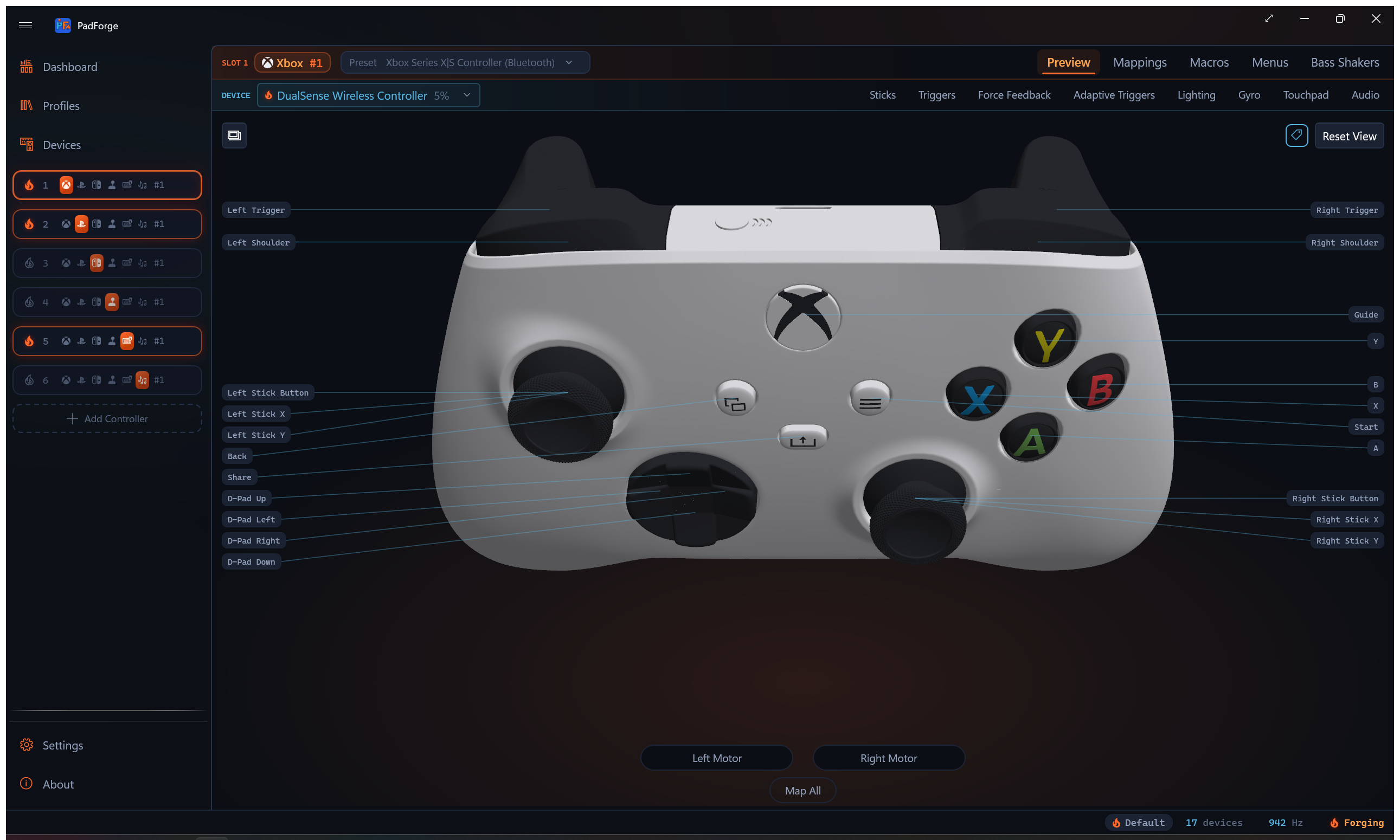
Material System
Xbox 360, all three Valve models, and Switch 2 Pro's generated parts use DiffuseMaterial over a SolidColorBrush. The hado families use DiffuseMaterial over a frozen ImageBrush atlas, sometimes inside a MaterialGroup with a SpecularMaterial on top. Three categories:
| Category | Source | Storage | Usage |
|---|---|---|---|
| Default | Per-colorway PNG atlases (Body.png, Decal.png, Transparent.png, StickModule.png), or flat hex colors on Xbox 360, Switch 2 Pro, and the Valve models. Xbox 360 face overlays use Alpha = 150. Registered by Paint / PaintTarget, never by assigning a geometry's material alone. |
DefaultMaterials[group] |
Restored after highlight/flash |
| Highlight | DrawAccentHighlights() reads SystemAccentColorPrimary (WPF-UI theme), falls back to #FF6B2C ember. One shared material for every group in the scene at the time it runs. |
HighlightMaterials[group] |
Applied on press or flash |
| Gradient | GradientHighlight() interpolates ARGB for solid defaults, or layers an alpha-scaled accent overlay for textured ones. |
ConditionalWeakTable keyed on the GeometryModel3D |
Sticks and triggers (proportional) |
Gradient materials are retained per geometry and mutated in place rather than reallocated. The DualSense TransparentTrim and MuteButton set their highlight material by hand, since DrawAccentHighlights() ran before either joined the scene.
Coordinate System and Transformations
Model Space
Standard WPF3D right-handed coordinates:
| Axis | Direction |
|---|---|
| X | Left (negative) / Right (positive) |
| Y | Forward-backward (camera view axis) |
| Z | Up (positive) / Down (negative) |
Camera Setup
PerspectiveCamera: Position (0, -172, 132) (behind and above), LookDirection (0, 0.793, -0.609) (forward + slightly down), Z-up, 55-degree FOV.
Model Rotation Transform
ModelVisual3D.Transform is one Transform3DGroup built in the constructor and mutated afterwards, never replaced. Replacing it would un-wire the yaw and pitch children and break left-drag rotation. Rotation lives here rather than on the camera so lighting stays screen-relative.
Child order matters:
| # | Transform | Axis | Source | Clamp |
|---|---|---|---|---|
| 1 | _modelRecenter |
Z | Static mesh bounds at load | none |
| 2 | _modelScaleTransform |
uniform | ControllerModelBase.ModelScale |
none |
| 3 | Yaw | Z (0,0,1) | Left-drag horizontal | none |
| 4 | Pitch | X (1,0,0) | Left-drag vertical | −60–+60 degrees |
Recenter runs first, in model units, so the scale and both rotations see a model whose visual center is the origin. The camera frames the origin and yaw/pitch pivot there, so a family authored off-center would hang off-center and rotate about the wrong point. The DS4 meshes are authored with their vertical center 21.9 mm below origin, every other family within 6 mm, which is why the DS4 sat low and clipped its handles when pitched front-facing. Scale comes before rotation so the rotated controller does not scale around its rotated bounding-box center.
Joystick Tilt Transform
Transform3DGroup on both ring and thumb meshes:
1. X tilt: Around Z axis, proportional to stick X, centered at JoystickRotationPointCenter{Left/Right}Millimeter.
2. Y tilt: Around X axis, proportional to stick Y, same center.
Both capped at JoystickMaxAngleDeg: 19 degrees on Xbox 360 and DS4, 18 on both Steam Controllers, 14 on Xbox Series, DualSense, Switch 2 Pro, and the Steam Deck.
Trigger Rotation Transform
Rotates around X axis at ShoulderTriggerRotationPointCenter{Left/Right}Millimeter. Angle: -TriggerMaxAngleDeg * value (negative = downward). Skips update if angle delta < 0.01 degrees.
Lighting
Three light sources in XAML:
- SunLight: HelixToolkit built-in (ambient + directional, world-space).
- DirectionalHeadLight: Camera-relative at brightness 0.35, prevents dark spots during rotation.
- Ember rim DirectionalLight (#175): dim warm rim, Color="#5A321C", Direction="0,-0.7,0.7" (from behind and below), so the model catches a forge-glow edge. The RGB stays low to keep it a rim rather than a wash.
Performance Considerations
| Technique | Detail |
|---|---|
| Visibility gate | OnRendering returns before any work when the control is not visible or the window is minimized. |
| Dirty flag batching | 31 button roles + 4 axes + 2 triggers + touchpad preview + annotation bars coalesced into one render-frame update. |
| High-churn property skip | The six gyro and accel readout properties never set _dirty, so a motion pad at rest does not re-arm the refresh every tick. |
| Trigger change detection | Skips rotation if angle delta < 0.01 degrees. |
| Visual deadzones | Stick grading below 0.05 deflection and trigger grading below 0.03 restore the rest material instead of grading, so sensor noise does not hold the glow lit. |
| Retained transforms | Per-stick rotation graphs live in _stickTransforms3D and get their two angles mutated, instead of a five-object graph allocated per dirty frame. |
| Retained gradient materials | Per-geometry ConditionalWeakTable entries whose brush color is mutated in place. Weak keys let a rebuilt model's entries collect. |
| One-time mesh loading | OBJ meshes and PNG atlases load in the constructor. EnsureModel() recreates only when the family, the extra-controls flag, or the colorway changes. |
| Preview events | Tunneling events prevent double-processing by HelixToolkit and PadForge. |
See Also
- 2D Overlay System:
ControllerModel2DView(PNG overlay alternative to 3D),ControllerSchematicView,KBMPreviewView,MidiPreviewView - ViewModels:
PadViewModelproperties bound byControllerModelView - XAML Views:
PadPagehosts and switches between 3D, 2D, schematic, KBM, and MIDI views - Virtual Controllers: Output type determines which preview view is active
- Engine Library:
Gamepadstruct providing button/axis state for 3D animation - Build and Publish: 3D OBJ meshes (
3DModels/) included asEmbeddedResourceitems
Last updated for PadForge 4.5.0.